
HTML Form Templates You Can Copy by Job
HTML form templates grouped by the job they do: contact, address, registration, reimbursement, chat-style support and more, with accessible markup and the field each one actually needs.

HTML form templates are copy-ready field lists for a job, not a gallery of skins. The useful ones tell you which inputs belong together, which ones are required and what the button is allowed to promise. A pretty layout with the wrong fields is how shipping ends up in Address line 2.
This page is a map of templates on Core Forms, grouped by that job. It is not a repeat of the 12 HTML form examples, which teach the patterns. It is also not the industry WordPress templates list, which is 16 trades with a 3-step plugin form. Here the unit is still plain HTML you can paste.
I build Core Forms, and the live previews live under /templates/. The HTML on those pages is free to copy whether or not you use the plugin.
There are generally three ways people use a form template.
You can copy every field the template shipped because it looked complete, and then wonder why half the visitors stall on a phone field you never call.
Or you can write a 2-field form for a job that needs a file, a date or a consent, and then chase the rest over email.
But being extreme isn’t a good idea at all. A template should be the smallest set that finishes the job. It is wise to start from one that matches the decision, then delete anything you will not use.
Pick the job first. The fields are just evidence for that job.
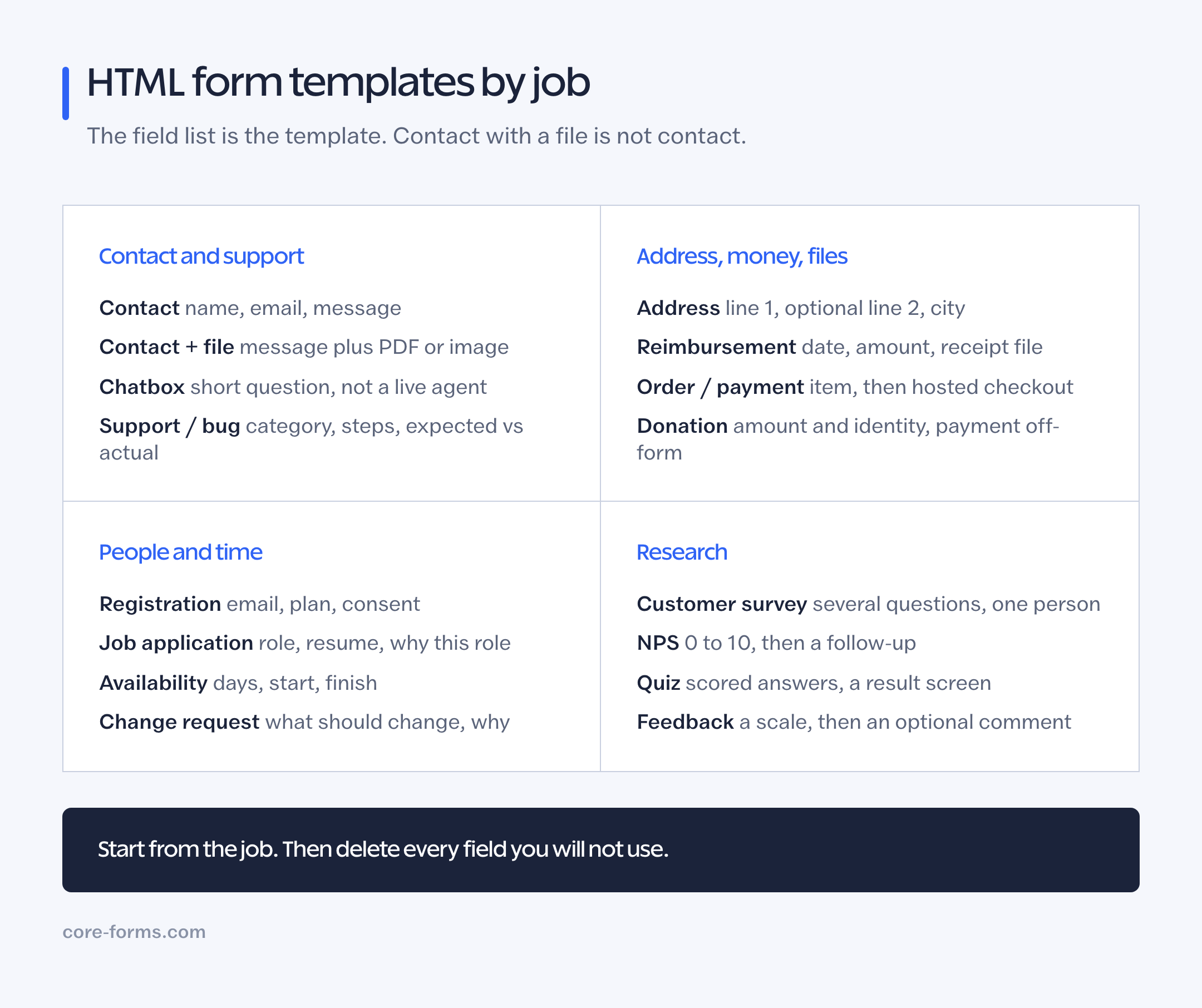 Each template is a job. Contact, address and reimbursement do not share a field list.
Contact and Support
These collect a message. They differ in what has to ride along with it.
- Contact form: name, email, optional subject, message. The default. Do not add phone, company and budget because other contact forms do.
- Contact form with file upload: the same message, plus an optional PDF or image. Use it when the request is incomplete without a screenshot. Never accept executables.
- Chatbox form: a short name, email and “how can we help?” for a floating panel. It is a form that looks like a chat bubble, not a chatbot. The confirmation should say when they will hear back.
- Support request: site URL, category, priority, subject and a description. For a product that already has tickets, not for a brochure contact page.
- Bug report: steps, expected, actual. A contact form with a “what’s wrong” box is not this.
- Feedback form: a consistent scale, then an optional comment.
The HTML form to email post is what happens after these submit.
Address, Money and Files
These fail when line 1, line 2 and city get mashed into one box.
- Address form: line 1, optional line 2, city, region, postal code, country, with the right
autocompletevalues. Line 2 is the unit, and it stays optional. The address line 1 vs line 2 explainer is the longer caution. - Payment form: identity and the item, then a provider-hosted checkout. Do not collect card numbers in HTML.
- Order form: what they want, how many, where it goes.
- Reimbursement form: who spent, the date on the receipt, the type, the amount, the description and the receipt file. The file is the proof. Card numbers do not belong here.
- Donation form: amount and identity, with payment off-form.
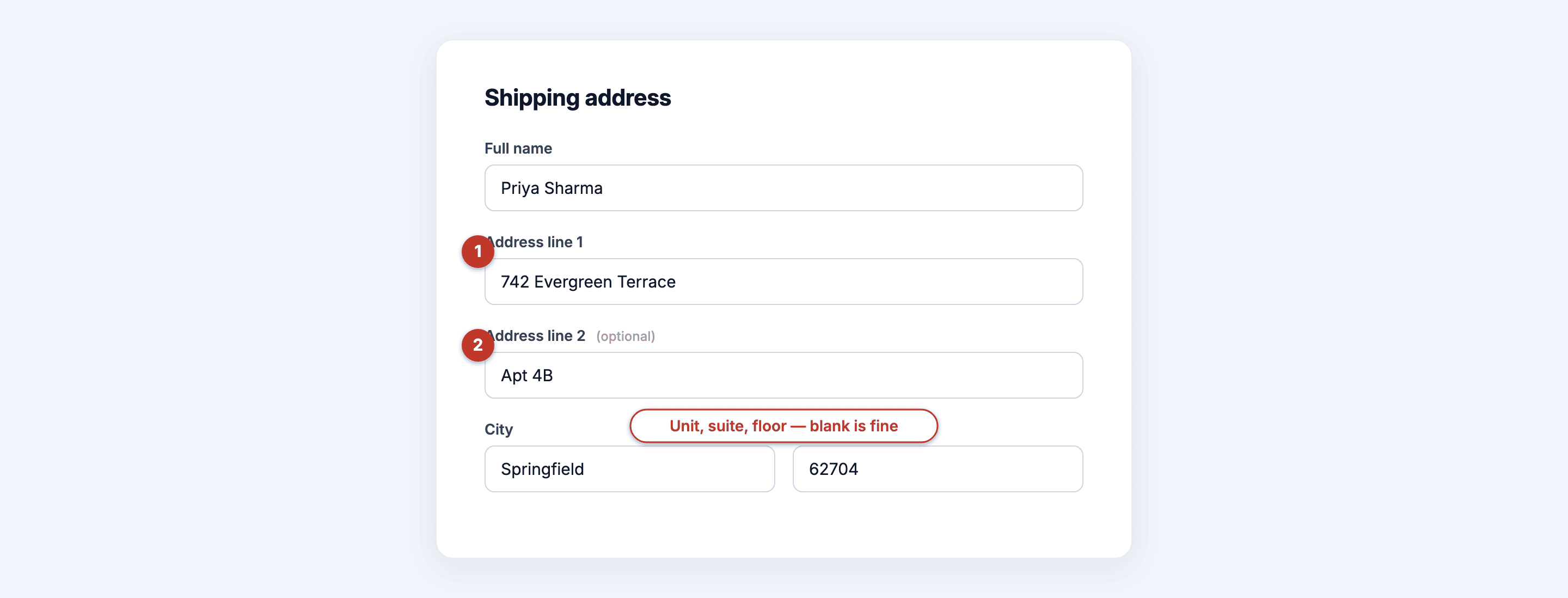 Line 1 is the building. Line 2 is the unit. City never shares that box.
People, Time and Registration
- Registration form: name, email, optional organization, plan, consent. Do not collect a password on a public HTML form unless a real account system hashes it on the server.
- Job application: identity, role, resume, a focused “why this role.”
- Employee availability: days, earliest start, latest finish, a short operational note. Not a medical history.
- Event RSVP: attending or not, guest count, only the practical needs you will handle.
- Newsletter signup: email, and a name only if the mail will use it.
- Lead capture: email plus one segmentation signal tied to the offer.
- Change request: project, priority, what should change, why. Submit is a log, not an approval.
Research
- Customer survey: several questions, one person, one row.
- NPS survey: 0 to 10, then a follow-up for low scores.
- Quiz: scored answers and a result, not a contact form with points.
The WordPress survey plugin page is the buying decision. The survey how-to is the build.
What Every HTML Form Template Should Include
Regardless of job, the markup should have:
- a visible
<label>for every control, tied withfor/id autocompleteon name, email and address fieldsrequiredandaria-requiredon the fields that actually block the job- a button that names the outcome: Send message, Save address, Submit claim
- a file
acceptlist when there is a file, plus a size limit you will enforce on the server
The HTML form examples article shows those rules in 12 worked snippets. Use this page to pick the template, that one to see the pattern up close.
Industry-specific WordPress starters (clinic, freight, catering, salon) live in the industry templates post and at /templates/. They are 3-step plugin forms. They are not extra HTML skins of the contact form.
How to Use One Without Making It Worse
Open the template that matches the job. Delete every field you cannot justify in a sentence. Keep the labels. Change the button. Set the success copy to the thing that will actually happen.
Then POST it somewhere real. A template without a form backend is a drawing of a form. Web3Forms, Formspree, Formspark or WordPress can be that backend. The HTML form backend alternatives page is the shelf.
The Limits
These templates are starting points, not legal forms. A registration form is not a full account system. An address form is not a carrier-validated checkout. A change request is not an SLA.
I will not add a survey template that duplicates the customer survey, or a second contact form that only changes the heading. If the job is not in the list, start from contact or support and add the one field the job needs.
Final Remarks
An HTML form template earns its URL when the field list is the job. Contact with a file is not contact. Address is not a textarea. Reimbursement is not “message plus upload” without an amount and a date.
Pick the template whose outcome you can print on the button. Then delete a field. If you cannot delete one, you probably started from the right page.