
Form UX
Address Line 1 and 2: Meaning, Differences, and Examples
Address line 1 holds the street number and name. Address line 2 holds the apartment, suite, or unit. See examples and when to leave line 2 blank.

Address line 1 contains the street address, such as 742 Evergreen Terrace. Address line 2 contains the apartment, suite, unit, floor, or room inside that building. If you don’t have one, leave address line 2 blank.
The difference is simple: address line 1 gets mail to the building, while address line 2 identifies the recipient’s location inside it. Don’t write “N/A”, repeat the street, or put the city in line 2. I’ve been shipping client forms since 2009, and address fields are still the ones checkouts get wrong most often.
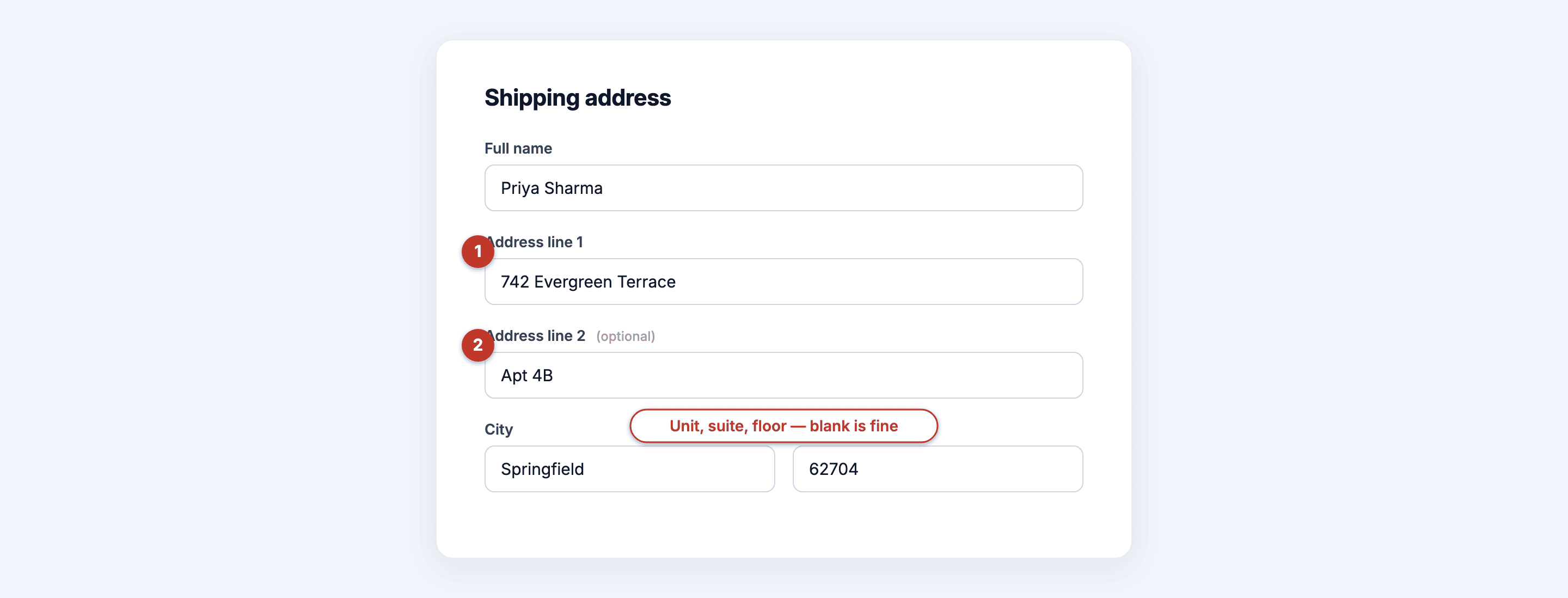 Line 1 finds the building. Line 2 finds you inside it, and it stays optional.
Address line 1 and 2 examples
These examples use the common street-and-unit split in address forms. Line 1 holds the street address or PO box for the intended delivery. Line 2 adds the apartment, suite or room when you need one. A form’s field numbers don’t necessarily match the lines on the printed mailing label.
| Address type | Address line 1 | Address line 2 |
|---|---|---|
| Standalone house | 742 Evergreen Terrace | (leave blank) |
| Apartment | 350 N Main St | Apt 4B |
| Office suite | 1200 Market Street | Suite 210 |
| PO box | PO Box 1042 | (leave blank) |
| Dorm or complex | 88 College Ave | Building C, Room 214 |
| Warehouse unit | 500 Industrial Road | Unit 12 |
Two of these six examples leave address line 2 blank. That’s normal.
What goes in address line 1
Address line 1 holds everything a delivery driver needs to find the building: the house or building number, the street name, and the street type (St, Ave, Blvd, Road). If your street has a directional, that goes here too, such as 350 N Main St rather than just Main St.
Concrete examples:
742 Evergreen Terrace1600 Amphitheatre Parkway221B Baker Street(the B is part of the building number here, not a unit)PO Box 1042(a PO box replaces the street address, so it lives in line 1)
A useful starting rule: the street number and name go in line 1, and the unit goes in line 2. If the site gives different instructions for your country or address type, follow those instructions.
What goes in address line 2
Address line 2 holds the unit designator: apartment, suite, floor, unit, room, or building letter within a complex. It exists because one street address can contain hundreds of separate mailboxes, and the carrier needs to know which one is yours.
Typical values:
Apt 4BSuite 210Unit 12Floor 3Building C
What doesn’t go in line 2: your city, a landmark (“near the blue water tank”), delivery instructions (“ring twice”), or a second unrelated address. Instructions belong in a delivery-notes field if the form offers one. Cramming them into line 2 gets them printed onto a shipping label where nobody reads them as instructions.
Address line 2 is optional
If you live in a standalone house, address line 2 stays empty. That’s the correct answer, not a mistake. The field is there for addresses that need extra detail.
This is the single biggest confusion with the field, from both sides:
Users invent filler. People type “N/A”, “None”, or repeat their street because an empty box feels wrong. All of that ends up printed on the label. If you don’t have a unit, leave it blank.
Form builders mark it required. I’ve audited checkouts where line 2 was a required field, forcing every house-dweller on the site to type garbage to proceed. Never make address line 2 required. There is no valid reason. If your validation rejects an empty line 2, your validation is wrong.
How to write an address on one line
To write an address on one line, run the pieces together in order, separated by commas: street address, unit, city, state, postal code. The unit slots in right after the street, exactly where line 2 would have gone.
742 Evergreen Terrace, Apt 4B, Springfield, IL 62704Without a unit, drop that segment:
742 Evergreen Terrace, Springfield, IL 62704USPS Publication 28 prefers an apartment or suite at the end of the delivery address line. If it won’t fit, the unit information goes on the line above the street address. The two-line split in a checkout is a data-entry convenience; your shipping-label formatter should arrange the collected fields for the destination country.
Designing address fields in your own forms
Building the address block yourself? Three decisions matter more than anything else: the labels, the autocomplete attributes, and keeping line 2 optional.
Label in plain language. “Street address” and “Apartment, suite, unit (optional)” outperform “Address line 1” and “Address line 2”. The generic labels are what cause the “N/A” filler in the first place. Put the word optional in the line-2 label itself, and pair every input with a visible label; the accessibility page covers why placeholder-only labels fail.
Set the autocomplete attributes. Browsers can fill the whole block in one click, but only if you tell them which field is which. MDN’s autocomplete reference lists every field name browsers understand:
<label>Street address
  <input type="text" name="address1" autocomplete="address-line1" required />
</label>
<label>Apartment, suite, unit (optional)
  <input type="text" name="address2" autocomplete="address-line2" />
</label>
Note the required on line 1 and its absence on line 2. That asymmetry is the whole point of this post in two attributes. If you write your forms in HTML, my case for skipping the builder covers why I do. In Core Forms, the form templates give you a starting checkout block so you’re editing instead of typing from scratch.
Only collect an address when you ship something. A contact form doesn’t need one. Same logic as the GDPR consent pattern: every field you don’t collect is a field you don’t have to protect.
Where I’d do it differently: if your audience is international, I wouldn’t force every address into a US street-and-unit pattern. You can collect the country first, adapt the labels and allow the address lines the destination needs. Australia Post’s addressing guide is one example of why the lines on an envelope and the numbered fields in a form should be treated separately.
FAQ
What is address line 2?
Address line 2 is the optional second field in an address form for your unit inside a building: apartment number, suite, floor, unit, or building letter. It exists because one street address can hold many mailboxes. If your address has no unit, such as a standalone house or a PO box, leave it blank.
What do I put in address line 2 if I live in a house?
Nothing. Leave the field empty. A house address is complete with line 1, city, state, and ZIP. Don’t type “N/A” or “None”. Whatever you enter gets printed on the shipping label, and filler text can confuse carriers or address-validation software. Blank is the correct value for most addresses.
Where does a PO box go, line 1 or line 2?
When the PO box is your mailing destination and the form provides no separate PO-box field, you can put PO Box 1042 in address line 1 and leave line 2 blank. If the site asks for both a physical address and a mailing address, keep them in the fields it provides. USPS dual-address guidance says the intended delivery address belongs immediately above the city, state and ZIP code on the mailing label.
Where does “c/o” (care of) go?
c/o identifies the person receiving mail on someone else’s behalf. It isn’t an apartment or suite number. A USPS care-of example places that name between the recipient and the street address. In an online form, you should use a dedicated care-of or company field when one is available, or follow the site’s instructions. Keep the actual recipient’s name in the recipient field.
Is there an address line 3?
Some forms offer an address line 3 for edge cases, such as a building name plus a unit plus a mailstop in campus and corporate addresses. Most people never need it. If a form only has two lines, combine the extras in line 2: Building C, Room 214 works fine as a single line.