
Licensing
How Software License Activation Works: Keys, Limits, Heartbeats
License activation is a handshake: your key, your site URL, a server counting slots. Here's how limits, heartbeats, and deactivation actually work.

License activation is a handshake. Your plugin or theme sends a message to the vendor’s license server that says “key X is now in use on site Y.” The server checks the key, counts how many sites already use it against the plan’s activation limit, and answers valid or invalid. Deactivation is the reverse handshake: it frees the slot so another site can take it.
That’s the whole mechanism. Everything else — heartbeats, limits, “activation limit reached” errors — is bookkeeping layered on top of that one exchange.
I’ve been on both sides of this. I’ve hit the limit error as a user on a Friday deploy, and I’ve built the server side into Core Forms. This post explains license activation for both audiences.
The license activation lifecycle
A license goes through three moves: activate, validate, deactivate. Activation registers a site against the key. Validation re-checks the key periodically — the heartbeat — to confirm it’s still valid. Deactivation removes the site and frees the activation slot. Every commercial licensing scheme I’ve seen is a variation of these three calls.
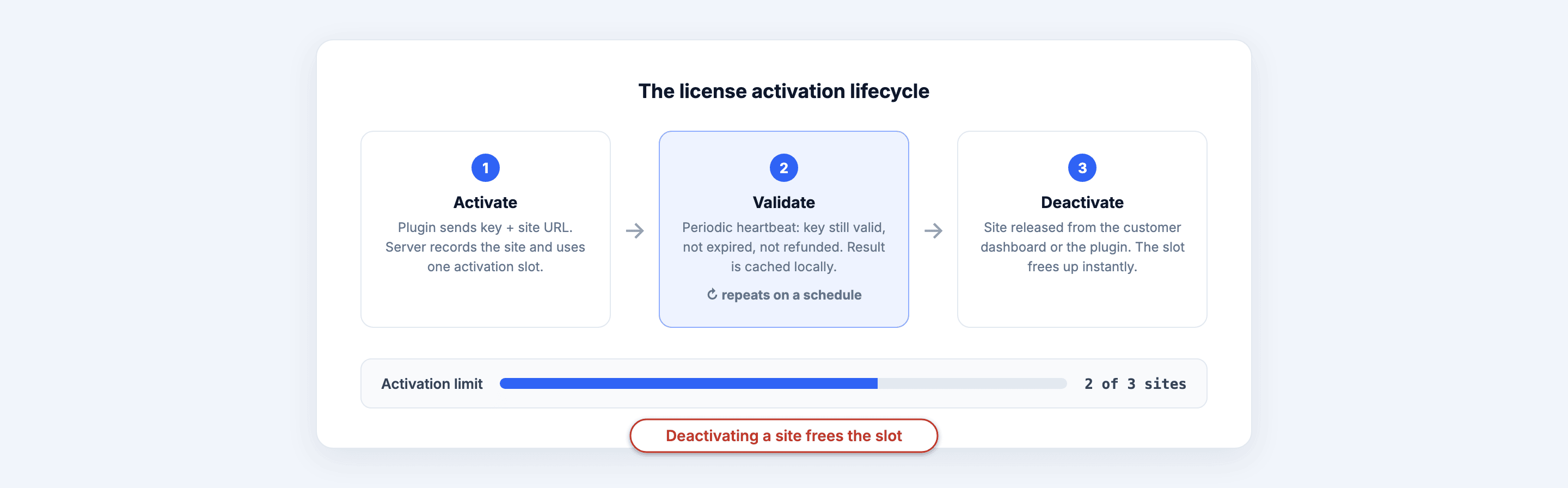 The three calls every licensing scheme makes, and the counter that decides whether the first one succeeds.
Activate happens once, when you paste the key into the plugin’s settings. The plugin sends the key plus your site URL to the license server. The server records the pairing.
Validate happens quietly on a schedule — daily or weekly is typical. Same key, same URL, and the server answers with the current status: valid, expired, disabled.
Deactivate happens when you click “deactivate” in the plugin or remove the site from the vendor’s dashboard. The pairing is deleted, the slot opens up.
The key itself is just a random string — the server holds all the state. That’s why license key activation never works offline: without the server’s answer, the key is meaningless.
Why activation limits exist
Activation limits exist so vendors can price by usage instead of charging everyone the agency rate. A freelancer with one site pays the single-site price. An agency running the plugin on thirty client sites pays more. The software activation limit is the enforcement mechanism for that tiering — not a punishment, just a meter.
The typical ladder: 1 site, 3–5 sites, unlimited. The limit lives on the plan, not the key. Buy the single-site plan, and your key carries one activation slot. Upgrade, and the same key usually gets more slots.
Without limits, the alternative is one price for everyone. That price ends up too high for the solo user and too low for the agency. Limits are what make the cheap tier possible.
“Activation limit reached” — how to fix it as a user
The fix is almost always to deactivate an old site, not to buy anything. Log in to the vendor’s customer dashboard, find the license, look at the list of activated sites, and remove the one you no longer use. The slot frees immediately; activate the new site.
The usual culprits:
A dead staging site is holding a slot. You cloned production to staging six months ago, the key went along for the ride, and the staging site activated itself. Deactivate it from the dashboard.
A site you migrated is counted twice. Old domain and new domain both registered. Remove the old one.
The site was deleted without deactivating. The plugin never got a chance to send the deactivate call. The server still thinks the site exists. Dashboard removal is the only fix — this is exactly why good vendors give you one.
Worth knowing: good vendors don’t count development domains against your limit at all. Localhost, .test domains, and obvious staging subdomains often activate freely without consuming a slot. If your vendor charges you an activation for staging.yoursite.com, that’s a policy choice worth complaining about.
If none of that works, email support. Vendors reset activations all the time; it’s a thirty-second admin task on their end.
What a validation heartbeat checks
The heartbeat answers one question: is this key still good? Concretely, the server checks that the key exists, hasn’t expired, hasn’t been disabled after a refund, and that this site is still on the activation list. The answer comes back as a status the plugin can act on — show a renewal notice, disable updates, whatever the vendor decided.
The part that separates good schemes from bad ones is caching. A well-built plugin stores the last heartbeat answer locally and keeps trusting it if the license server doesn’t respond. Server down for a day? The plugin keeps working on the cached “valid” and retries later. The heartbeat is a periodic sync, not a per-pageload permission check.
The other honest detail: heartbeats send your site URL to the vendor on a schedule. That’s the trade. It’s how the vendor knows which sites are active, and it’s also a phone-home. A trustworthy scheme sends the minimum — key, URL, maybe the plugin version for update checks — and nothing else.
Designing it as a developer
If you’re building the server side, you need four endpoints and a counter. Core Forms ships this as a license issuing server built into the plugin, so I’ll describe the shape using what it actually does.
Activation counts per-site slots against the plan’s limit — you set the activation limit when you define the plan, alongside price, billing period, and license duration. Customers get a dashboard (a shortcode, [cf_license_dashboard]) where they see their keys, their activated sites, and — the part that saves your support inbox — a deactivate button next to each site. Self-service deactivation is the single highest-leverage feature in the whole scheme.
Expiry runs as daily maintenance: a scheduled task checks license end dates and flips overdue ones to expired. Refunds verified by the payment gateway disable the license. Nothing depends on the client plugin behaving well.
The API speaks the EDD Software Licensing dialect — check_license, activate_license, deactivate_license, get_version — because half the WordPress ecosystem’s client code already speaks it. If you’re writing the client side, I’ve documented the full request/response shapes in the licensing API walkthrough, and the commerce setup docs cover wiring the checkout form. For the broader build-vs-buy question, start with the software license manager piece.
One honest boundary: the payment provider still owns recurring charging and stored payment methods, and none of this handles sales tax for you. A license server tracks terms and access; it isn’t a merchant of record.
When activation schemes go wrong
Bad license activation schemes fail in two predictable ways: they phone home too often, and they break the product when the server breaks.
Per-pageload validation. Some plugins check the license on every request or every admin page load. That adds latency to someone else’s site and turns your server into a dependency of theirs. Validate daily, cache the answer.
Kill switches on server outage. If your license server goes down and every customer’s plugin stops working, you’ve shipped a denial-of-service against your own users. The plugin should degrade gracefully: keep functioning, maybe pause updates, retry the check later.
No self-service deactivation. Every migration and staging clone becomes a support ticket. The dashboard deactivate button isn’t a nice-to-have; it’s the difference between a licensing scheme customers tolerate and one they resent.
If you’re a user evaluating a plugin, test the scheme: block the vendor’s domain in your firewall and see if the plugin still works. If it doesn’t, that’s your answer about how it was designed.
FAQ
What does “license activation” actually do?
Activation registers your site’s URL against your license key on the vendor’s server. The server counts that registration against your plan’s site limit and answers valid or invalid. The plugin stores the answer locally and unlocks updates and support features. No activation, no update channel — the plugin itself usually still runs.
Why does my license say “activation limit reached”?
Your key is registered on as many sites as your plan allows — often including dead staging copies or migrated domains that never deactivated. Open the vendor’s customer dashboard, review the activated-sites list, and remove the ones you no longer use. The slot frees immediately. Support can also reset activations manually.
Do staging and localhost sites count against my activation limit?
Depends on the vendor. Good schemes whitelist localhost, .test domains, and common staging subdomains so development copies don’t consume slots. Others count every URL. Check the vendor’s policy before cloning production — and deactivate staging sites you’re done with either way.
Will my plugin stop working if the license server goes down?
It shouldn’t. Well-built plugins cache the last validation answer and keep trusting it when the server is unreachable, retrying later. If a plugin dies the moment its vendor’s server does, that’s a design failure — the heartbeat is meant to be a periodic sync, not a live permission check.