
Licensing
A Software License Manager You Can Self-Host on WordPress
A software license manager does four jobs — keys, activations, downloads, expiry. Here's how to self-host all four on WordPress instead of paying a SaaS cut.

A software license manager does four jobs: issue keys, count activations, gate downloads and updates, and expire access when the term ends. That’s the whole product. Every licensing SaaS charging a revenue share is charging for those four jobs plus a checkout.
If you already run WordPress, you can self-host all four. Your site issues the keys, your database counts the activations, your Media Library serves the signed downloads, and a daily cron expires what’s overdue. No per-sale percentage leaving your account.
I sell a WordPress plugin for a living, so I’ve sat on both sides of this decision. Below is what a license manager actually does, an honest comparison of SaaS versus self-hosted — including the one thing SaaS genuinely does better — and the concrete flow for running your own.
What a software license manager actually does
A software license manager issues a unique key per purchase, validates that key when the customer’s site phones home, enforces an activation limit, serves the product ZIP and its updates, and revokes access on expiry or refund. Everything else — dashboards, emails, webhooks — is packaging around those four jobs.
Break them down:
Issue keys. Every paid order generates a key tied to a product, a plan, and a customer. The key is the customer’s proof of purchase and their update entitlement.
Count activations. A key sold for 3 sites should refuse the 4th. The manager records each activated URL and lets the customer deactivate a site to free a slot.
Gate downloads and updates. The ZIP shouldn’t be a public URL. Downloads go through the license check; plugin updates hit an API endpoint that verifies the key before returning the new version.
Expire access. Annual licenses stop receiving updates when the year ends. Refunds kill the key. Renewals extend it. This is license key management in one sentence: the key’s state must always match the money.
The two ways to run one
You either rent a software license manager from a SaaS — Freemius, Appsero, Lemon Squeezy — or you self-host one on your own site, which in WordPress land has meant EDD Software Licensing and now includes Core Forms. The trade is simple: SaaS takes a cut and handles tax; self-hosted costs a flat license and hands you the tax problem.
| SaaS (Freemius, Appsero, Lemon Squeezy) | Self-hosted (EDD SL, Core Forms) | |
|---|---|---|
| Cost model | Revenue share — Freemius around 7%, Lemon Squeezy 5% + 50¢ per sale | Flat plugin license; gateway fees only (Stripe US cards: 2.9% + 30¢) |
| Data ownership | Customers, keys, and sales live in their database | Everything lives in your WordPress database |
| Tax handling | Freemius and Lemon Squeezy are merchants of record — they calculate and remit global VAT/sales tax | You (or your gateway’s tax tooling) handle tax. Nobody remits it for you |
| Maintenance | Theirs — uptime, backups, updates | Yours — your host, your backups, your update discipline |
Be clear-eyed about the tax row, because it’s the SaaS model’s real advantage, not the dashboards. A merchant of record legally sells the product for you and owns the VAT filings in dozens of jurisdictions. Self-hosting means that work is yours. For some sellers that alone is worth 7%.
On the self-hosted side, EDD Software Licensing has been the reference point for years — most WordPress product updaters in the wild speak its API. That matters later, because a compatible API means you can switch servers without rewriting your plugin’s update code.
Self-hosting on WordPress with Core Forms
Core Forms 4.4 ships a self-hosted license server as a built-in feature: you flip it on in Settings, and the plugin creates a customer dashboard page carrying the [cf_license_dashboard] shortcode. From that point your WordPress site is the licensing backend — the same install that runs your marketing pages.
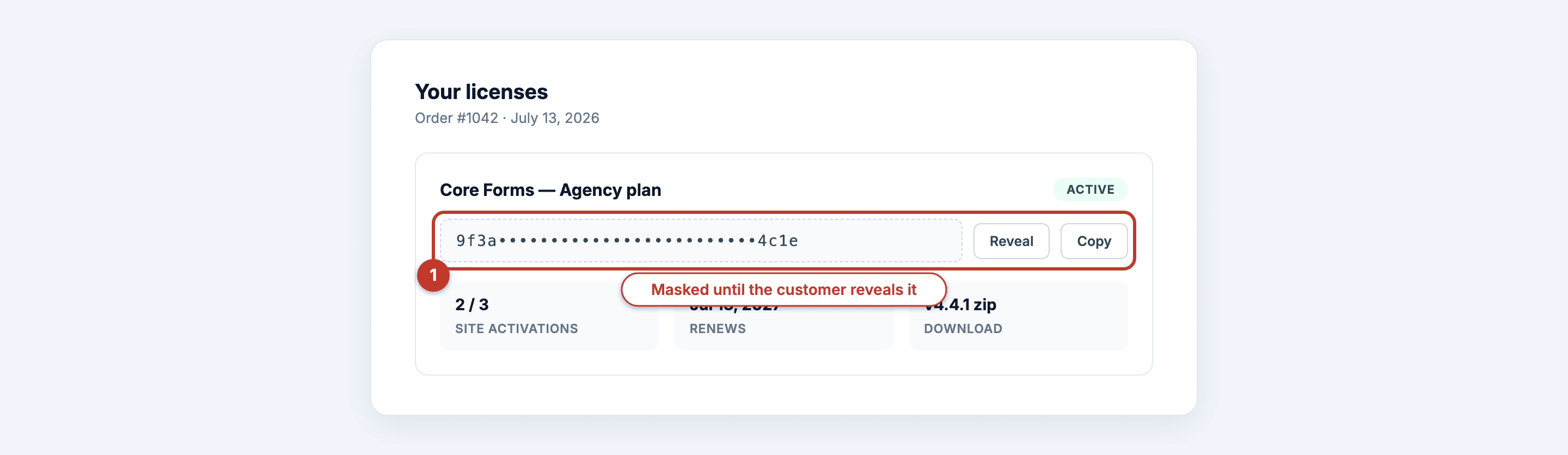 What the customer sees: their key masked until revealed, sites used against the limit, and a download link that expires in 15 minutes.
The flow, end to end:
1. Define products and plans. Under Core Forms → Products & Licensing, a product is the thing you sell — plugin, theme, digital download. Each plan sets price, currency, billing period, license duration, trial, and activation limit. One product, several plans, is the normal shape.
2. Upload versioned ZIPs. Releases go into the Media Library. Every file is SHA-256-verified before each download, download links expire after 15 minutes, and every download is audited. Full details are in the licensing feature overview.
3. Build the checkout form. Any payment-enabled Core Form works — Stripe, PayPal, Razorpay, Polar, or FluentCart. Add the “Fulfill License Purchase” action to the form. Fulfillment runs only after the gateway’s verified paid webhook, and it’s idempotent — a replayed webhook can’t create a duplicate key. Selling bundles works through a form field carrying product_id:plan_id:quantity values.
4. The customer gets their key. The dashboard shows orders, masked-but-revealable keys, downloads, expiry dates, and activated sites. Guests who checked out without an account get a signed link that works for 30 days.
The commerce setup docs walk each step with screenshots, and if you want to see what a generated key looks like before committing, the license key generator tool is a free sandbox.
One honest boundary: the payment provider still owns recurring charging and card storage. Core Forms tracks terms, access, cancellation, expiry, and renewal orders — it never touches the card.
What the keys enforce
A key enforces three things at runtime: an activation limit, an expiry date, and a per-site record the customer can manage. The client plugin calls /wp-json/core-forms/v1/check_license, activate_license, deactivate_license, and get_version — the same EDD-compatible contract most updaters already speak, and legacy ?edd_action= requests still work.
Activation limits. A 3-site plan activates on three URLs and rejects the fourth. The customer deactivates an old staging site from their dashboard and the slot frees up. No support ticket.
Expiry. A daily maintenance job (wp core-forms license maintenance if you prefer running it yourself) expires overdue licenses. Expired keys stop receiving updates through get_version.
Renewals and refunds. A “Renew License Subscription” form extends the license from the later of today or the current period end — early renewers don’t lose days. A verified refund disables the license and cancels the subscription automatically.
Who should not self-host
Don’t self-host a license server if you need a merchant of record, if you won’t maintain the server, or if you’re selling outside WordPress. Three groups, plainly:
You need someone else to own global tax. Selling meaningful volume into the EU and beyond means VAT registrations or a merchant of record. Freemius and Lemon Squeezy solve that legally; a self-hosted license server does not. If tax compliance keeps you up at night, pay the percentage.
You have zero appetite for ops. A self-hosted license server is only as reliable as your hosting, backups, and update habits. If your site going down for a day would strand customers mid-activation and you have no monitoring, rent instead.
You’re not selling WordPress-adjacent products. Core Forms’ license server assumes WordPress as the host and shines for plugins, themes, and digital downloads. Selling a desktop app with its own update pipeline? A dedicated licensing service is a better fit.
Everyone else — WordPress product sellers who already run a site and can do basic ops — is paying a revenue share for jobs their own server can do.
Developers integrating a plugin with the server want the licensing API field guide.
FAQ
What is a software license manager?
A software license manager is the system that issues a unique key per purchase, validates activations against a limit, serves gated downloads and updates, and expires or revokes access when licenses lapse or refund. It sits between your checkout and your product, keeping key state in sync with the money.
Can WordPress work as a self-hosted license server?
Yes. EDD Software Licensing has done it for years, and Core Forms 4.4 ships a built-in license server: products, plans, checkout via any payment-enabled form, customer dashboards, signed downloads, and an EDD-compatible client API. Your existing WordPress site becomes the licensing backend with no separate infrastructure.
Is self-hosting license key management cheaper than a SaaS?
Usually, once volume is real. A SaaS takes 5–7% of every sale forever; self-hosted costs a flat license plus gateway fees around 2.9% + 30¢. The catch is tax — merchants of record remit global VAT for you, and self-hosting hands that work back to you or your accountant.
Do license keys stop working when they expire?
The software keeps running — expiry gates updates and downloads, not the installed product. An expired key fails the get_version check, so no new releases, and downloads are refused. Renewing extends the license from the later of today or the period end, restoring update access.