
HTML Form to Email: What Actually Sends the Message
An HTML form does not send email by itself. mailto is a trap, PHP mail is fragile and a form backend or WordPress is the path that actually delivers.

An HTML form to email setup is a page that collects fields and a system that turns the submit into a message you can read. The form tag does not send mail. method="POST" only says how the browser ships the fields. Something behind that request has to accept them, filter spam and hand them to an inbox.
This is what the HTML form to email problem is all about. Before going into detail, I want to ensure you understand the basics. The browser can open a mail app. It cannot authenticate with Gmail, attach a proper From header or store the row when the email is lost.
There are generally three ways people try this.
You can set action="mailto:you@example.com" and hope the visitor’s device has a mail client that cooperates. A lot of phones will. A lot of desktop browsers will show a prompt, a blank window or nothing.
Or you can drop a 20-line PHP mail() script on a host and treat “it worked on my cPanel” as a mail system. Unauthenticated PHP mail is how contact forms disappear into spam folders.
But being extreme isn’t a good idea at all. You do not need a custom mail server. You do need a real backend: a hosted form endpoint or WordPress with authenticated outgoing mail. It is wise neither to trust mailto nor to invent SMTP from scratch for a contact page.
The form is HTML. The email is someone else’s job, and you have to name who.
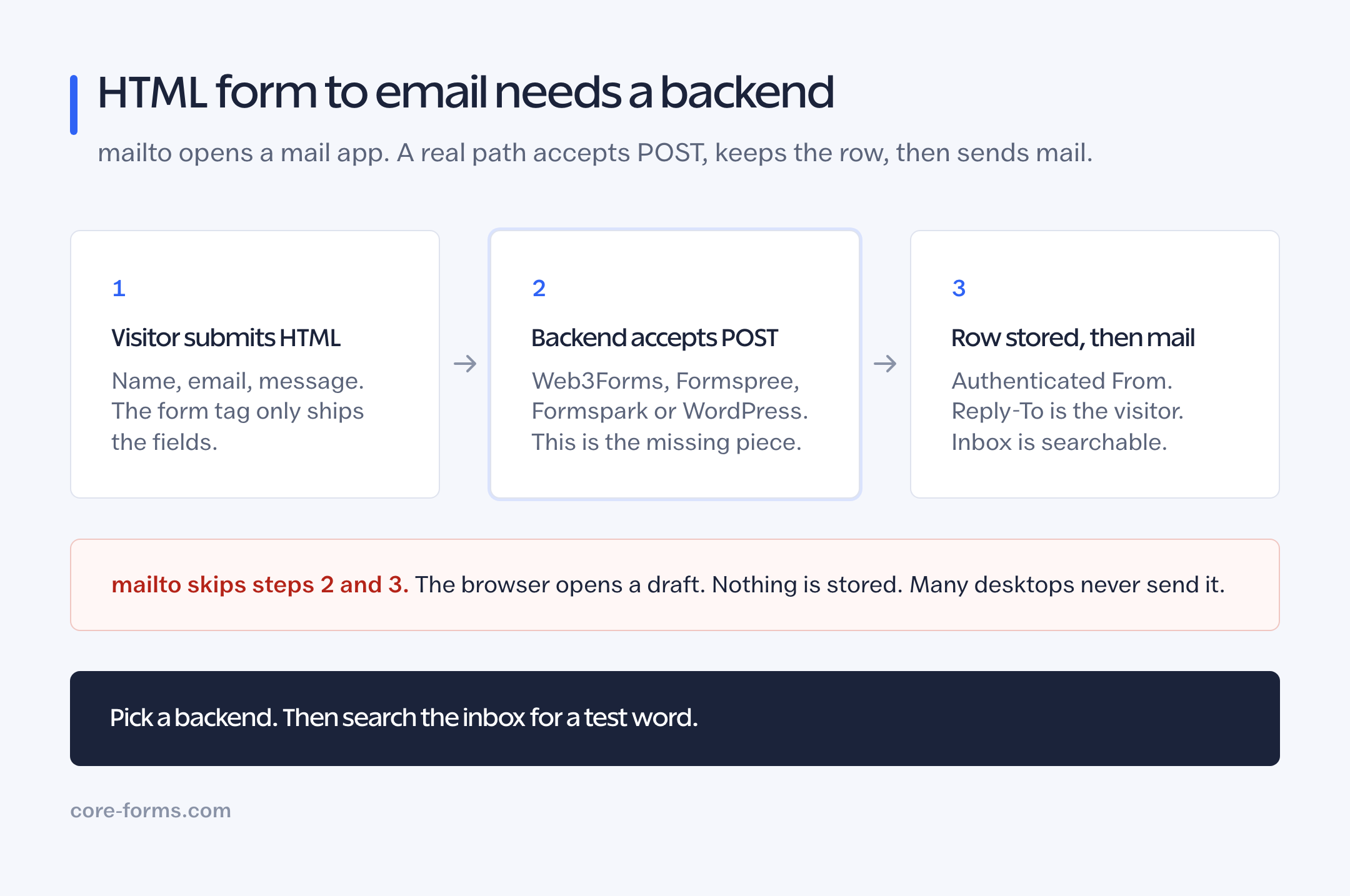 mailto opens a mail app. A backend accepts POST, then sends mail you can find later.
Why mailto Is Not HTML Form to Email
mailto in the action tells the browser to open the default mail app with the field values stuffed into a draft. Nothing is posted to your site. Nothing is stored. Nothing is filtered.
That fails in ordinary conditions:
- Chrome on a machine with no mail client
- iOS Safari when the visitor expected the page to say “sent”
- a required file input, which mailto cannot attach from a web form in any reliable way
- a visitor who closes the draft and thinks they submitted
You also published the inbox in the HTML, so harvesters do not even need to parse a page for href="mailto:". They get it from action.
A visible email address as a fallback is still useful. That is a different job, and the contact form vs email address post is the one that splits them. The form itself should POST.
What a Working HTML Form to Email Path Looks Like
The visitor submits. A server you chose accepts the POST. That server then:
- validates the fields
- drops obvious spam
- stores the row, or at least keeps it long enough to retry
- sends you mail through an authenticated route
- optionally sends the visitor a confirmation
Those 5 steps are the product. Web3Forms, Formspree, Formspark, Formcarry, Netlify Forms and a WordPress plugin are different packaging of the same list.
 The page is still HTML. The POST is what changed.
Four Backends That Actually Send
A hosted form endpoint
The HTML action is https://api.web3forms.com/submit, https://formspree.io/f/{id}, https://submit-form.com/{id} or a Formcarry URL. You keep your markup. They keep the inbox.
This is the right path when the site is static and you do not want to run PHP or WordPress. Caps and prices differ, and the Web3Forms alternative and Formspree alternative posts are the shopping version. The HTML form backend roundup covers the smaller endpoints.
Netlify Forms
If the site deploys on Netlify, data-netlify="true" makes the deploy the backend. No third-party action. The lock is the host. The Netlify Forms alternative post is the leave-or-stay version.
A PHP script on your host
A small process.php that reads $_POST and calls mail() will send something, on a good day. Deliverability is the problem, not the HTML. Hosts that still allow raw mail() are the ones whose IP reputation is already tired. If you go this way, send through SMTP or an API (Postmark, Mailgun, SES) from that script, and log the row to a file or database before you send. A script that only sends is a script you cannot debug.
I would not start here for a client contact form in 2026. The hosted endpoints exist so you do not.
WordPress as the mailer
If WordPress is in the stack, it is the most complete HTML form to email path I will recommend, and I built Core Forms for that job, so weigh that.
The form HTML can live in a WordPress page or on a static site that POSTs to WordPress. Core Forms stores the submission, runs honeypot and captcha, sends the admin notification and can send an autoresponder. Outgoing mail still needs an authenticated sender. The WordPress form not sending email checklist is the delivery half of this article.
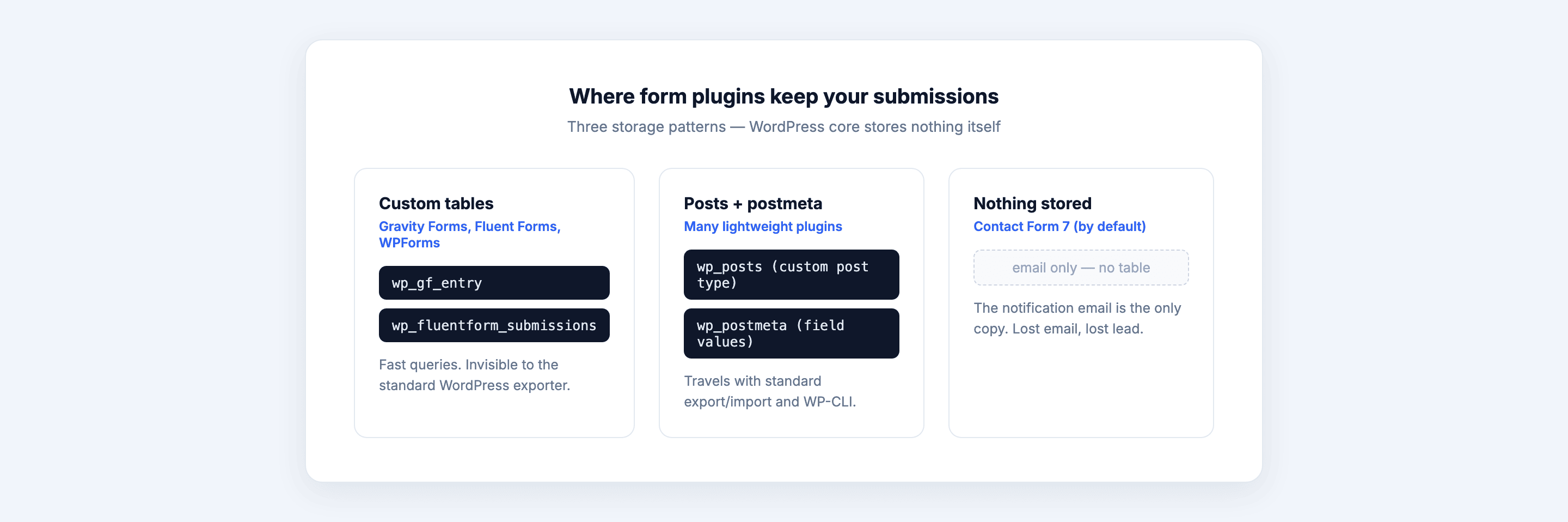 If the row is in the inbox, the form worked. Mail is a separate system.
Copy-Ready HTML
Labels, autocomplete and a button that names the outcome. Swap only the action.
<form action="https://YOUR-BACKEND/submit" method="POST">
  <p>
    <label for="contact-name">Name</label>
    <input id="contact-name" name="name" type="text"
           autocomplete="name" required>
  </p>
  <p>
    <label for="contact-email">Email</label>
    <input id="contact-email" name="email" type="email"
           autocomplete="email" required>
  </p>
  <p>
    <label for="contact-message">Message</label>
    <textarea id="contact-message" name="message" rows="6" required></textarea>
  </p>
  <button type="submit">Send message</button>
</form>
For Web3Forms, add a hidden access_key. For Formspree, the action already is the form id. For Core Forms on a WordPress page you often skip action entirely and let the plugin handle the POST. For a static page talking to WordPress, the action is the REST submit URL from the headless WordPress forms guide.
The contact form template is this pattern with a live preview. The contact form with file upload template is the same form plus a PDF or image field, which mailto cannot do and a backend must allow on your plan.
What Has to Be True After Submit
A working HTML form to email setup should survive these checks:
- A test with a unique word shows up in the destination inbox or in a submissions table, not only as a browser “success” state.
- A missing required field does not send mail. Validation happens before the message.
- The From header is a domain you control. A From of
wordpress@the-hostornoreply@web3formsthat you never set up will land in spam, and the form emails in spam post is the longer version. - Reply-To is the visitor. Otherwise every reply you send goes nowhere useful.
- The visitor sees a specific next step. “Sent” is better than “Submit succeeded.” “We reply within one working day” is better than “Sent.”
If the backend stores the row, you can prove the form even when mail is late. If it does not, you are debugging in the dark.
The Limits
This is not a guide to building an ESP. Transactional mail for receipts, password resets and newsletters is a different queue, a different From domain and usually a different product.
It is also not “how to make PHP mail() work.” If the host’s mail() is the only option, the form is already on the wrong host for mail.
I have not measured deliverability for every hosted endpoint in this post. The failure modes for mailto and unauthenticated mail() are the well-known ones. For a given vendor, their docs own the From domain and SPF story.
What Quietly Ruins It
A success message that fires in JavaScript before the POST returns. The visitor is sure they sent. You have an empty inbox and no row.
A file field on a plan that does not accept files. The rest of the message may arrive. The resume will not. Say the allowed types on the page, the way the file uploads guide does.
Using the visitor’s address as From. That is spoofing. Use your domain as From and their address as Reply-To. Every mail provider that still cares about alignment will thank you by actually delivering.
Final Remarks
HTML form to email is a POST plus a mailer, not a mailto attribute. Pick a backend the same way you pick hosting: by who holds the row when the email is late.
Static site, small volume: Web3Forms or Formspark. Static site, a dashboard: Formspree. Already on Netlify: Netlify Forms until you leave. Already on WordPress: let WordPress store the submit and send the mail through SMTP.
Then send yourself a test with a word you can search. If that word is not in an inbox or a submissions table, the form is still only HTML.