
How to Create an NPS Survey Form in WordPress
Build a WordPress NPS survey with a 0-10 scale, an optional reason field, saved responses and the correct Net Promoter Score calculation.

To create an NPS survey form in WordPress, start with one required recommendation question, a 0-10 scale and an optional reason field. Keep the form short enough that someone can answer it without setting aside their afternoon.
I’d spend more time deciding when to send the survey than decorating the scale. A customer who has just signed up can’t judge the same experience as someone who has used your product for a month. Pick a useful moment and ask consistently.
Start with the NPS question and two optional fields
Use the NPS survey form template as your starting point. Keep the score required and make follow-up details optional.
The starting form contains:
- Recommendation score: “How likely are you to recommend us to a friend?” with one radio choice from 0 to 10.
- Reason: “What’s the main reason for your score?” with a text area.
- Email: an optional address for follow-up.
Replace “us” with your product, service or organization. Add “0 = not at all likely” and “10 = extremely likely” beside the scale so people don’t have to guess its direction. Keep that wording stable between survey rounds.
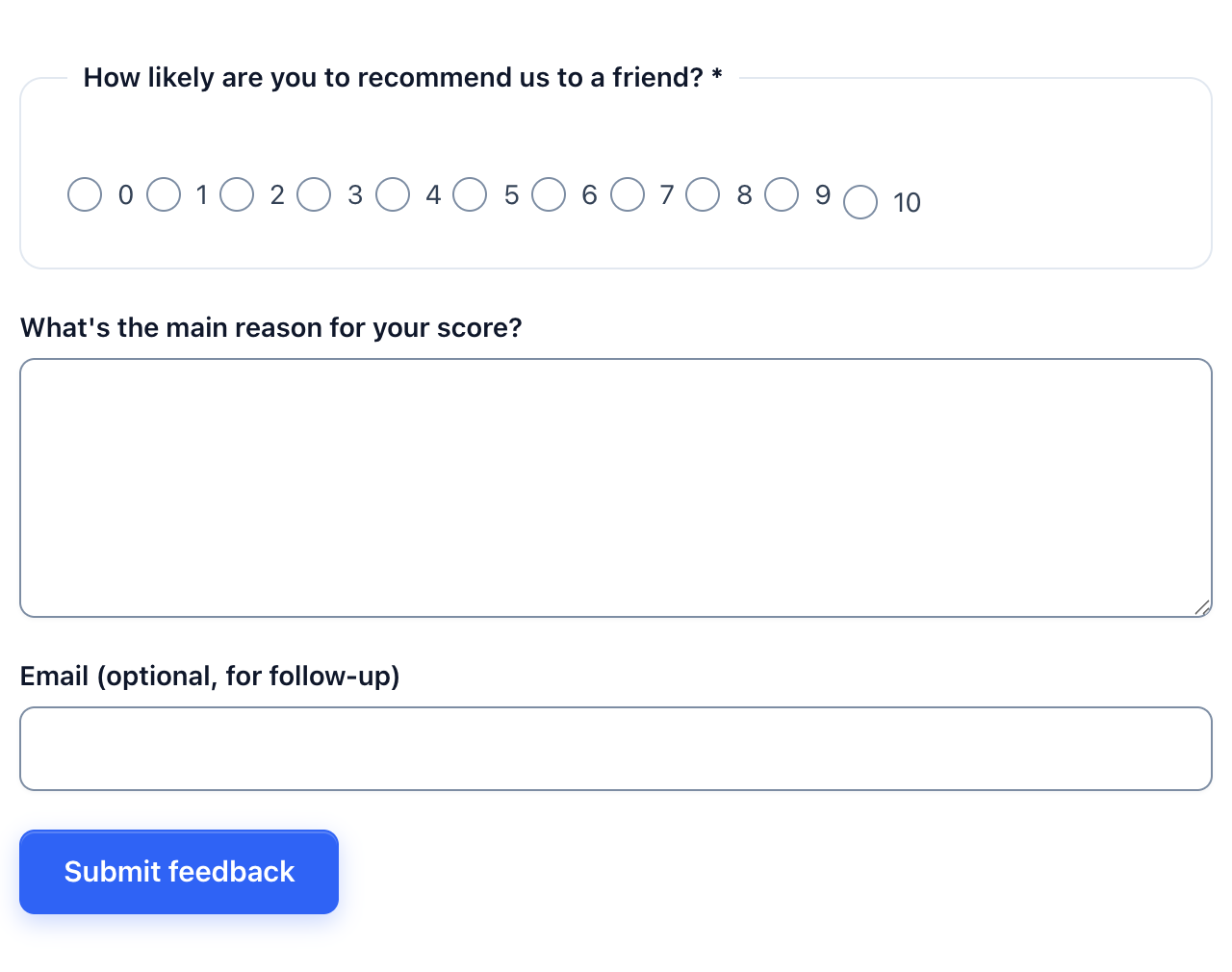 The starting NPS form. Add endpoint labels that suit your question before sharing it.
I wouldn’t make the reason field required. A score without a comment still helps calculate NPS. A forced comment often gives you “none” or a row of full stops. For useful follow-up prompts, see what to ask after an NPS score.
Create the NPS form in WordPress
Create a new Core Forms form, load the NPS / satisfaction survey template and save it with a name that identifies the audience. “Customer NPS after onboarding” is more useful in the inbox than “Survey 2.”
- Open Core Forms in your WordPress dashboard and add a new form.
- Choose the NPS / satisfaction survey template. The public template page also provides the starting markup if you’re building in Code mode.
- Replace the question’s subject with your product or service name.
- Keep the radio buttons under the same field name,
NPS, with values0through10. - Add the two endpoint labels. Keep the reason and email fields optional unless you have a specific need to identify every response.
- Save the form and confirm that submission storage is enabled in its settings.
For an HTML form, the radio value is the number you calculate with. Don’t change those values to labels such as happy and unhappy while leaving numbers visible on the page.
Use the Code editor documentation if you need to adjust the markup. You don’t need eleven separate questions: the eleven radio choices belong to one question.
Embed the survey and test the saved responses
Put the NPS survey on a page you can link to after the customer has had the experience you’re measuring. Use the Core Forms block or copy the form’s shortcode into a WordPress Shortcode block.
For example, a form with ID 196 uses:
[cf_form id="196"]Replace 196 with your own form ID. Publish the survey page, open it as a visitor and submit a few clearly labeled test responses.
Before inviting customers, check:
- Score 0: the saved score is
0, not an empty value. Zero is a valid answer. - Score 7: the response saves even when the optional reason and email fields are blank.
- Score 10: the saved score is
10, with any supplied comment attached to the same response. - No selected score: the required question prevents a normal submission.
- Mobile layout: all eleven choices remain visible, readable and selectable.
- Storage: the response appears in the form’s submissions inbox. A thank-you message alone doesn’t prove that you have a saved record.
Delete the test responses before calculating customer results. Keep submission storage and CSV export available so your analysis doesn’t depend on an email notification arriving.
Calculate NPS from all valid responses
Count the score groups, divide each relevant count by the total number of valid responses, then subtract the detractor percentage from the promoter percentage. The Bain Net Promoter System definition uses these groups:
- Detractors: scores 0 through 6.
- Passives: scores 7 and 8.
- Promoters: scores 9 and 10.
- NPS: percentage of promoters minus percentage of detractors, expressed as a score from -100 to 100.
Here’s an illustrative batch of 20 responses:
| Group | Responses | Share of all responses |
|---|---|---|
| Promoters | 12 | 60% |
| Passives | 5 | 25% |
| Detractors | 3 | 15% |
| Total | 20 | 100% |
The NPS is 45: 60 minus 15. Report it as 45 points, not “45% of customers are happy.” Passives stay in the denominator even though you don’t subtract their percentage.
Export the scores and use the NPS calculator to check your arithmetic. Exclude blank, invalid and test records; don’t quietly exclude low scores because the comments seem unreasonable.
Read the reasons before deciding what to change
I’d read the detractor comments alongside the score, then check whether promoters describe a repeatable strength. A number can tell you that something moved. The reasons help you choose what to investigate.
Keep these reporting details with your results:
- The number of valid responses and the collection period.
- Who received the survey and when they received it.
- The exact recommendation question.
- Any change in the audience, delivery method or product experience between rounds.
Don’t combine a post-support-ticket survey with a general relationship survey and treat the result as one comparable trend. If you need feedback about a specific interaction, a customer satisfaction question may be a better fit.
For a wider questionnaire, follow the WordPress survey setup guide. Keep this NPS form focused on recommendation and the reason behind it.
FAQ
Can I use a five-star rating for NPS?
- Standard NPS uses a 0-10 recommendation scale. A five-star satisfaction rating measures a different question and shouldn’t be converted into NPS by doubling the stars.
Does leaving email optional make the survey anonymous?
- Optional email doesn’t guarantee anonymity. Stored IP addresses, browser information, referral URLs or other integrations may still identify a respondent. Review your storage settings and privacy notice before describing the survey as anonymous.
Should the reason field be required?
I recommend leaving it optional for a short NPS survey. Ask for a reason clearly, but let someone submit a valid score without writing a comment.
How often should I send an NPS survey?
Choose a cadence that matches meaningful use of your product or service. Keep the audience and timing consistent enough to compare rounds, and avoid asking the same customer after every small interaction.