
WordPress as a Form Backend for HTML Forms
A form backend accepts HTML POSTs, stores the row and sends email. WordPress can be that backend for static sites, with submissions in WP-Admin instead of a SaaS dashboard.

A form backend is the service an HTML form posts to when the page itself has no server. Formspree, Web3Forms, Formspark and Formcarry are the usual names. WordPress can do the same job. The static page keeps the markup. WordPress accepts the POST, stores the submission, filters spam and sends the email.
This is a different article from headless WordPress forms. That one starts with a form that already lives in WordPress and renders it on Astro or Next.js. This one starts with HTML you already wrote, the way a FormBold or Web3Forms user would, and asks WordPress to be the endpoint.
I build Core Forms, so the REST examples below are from that plugin. The idea is not proprietary. Any WordPress form plugin with a documented submit URL can be a form backend. Most of them were not designed for it. Core Forms 4.1.0 was.
There are generally three ways people run HTML forms next to WordPress.
You can keep Web3Forms for the static site and WordPress for the blog, and reconcile two inboxes when a lead shows up in the wrong one.
Or you can move the whole marketing site into WordPress so the form can be a shortcode, which is a CMS decision made to fix a POST.
But being extreme isn’t a good idea at all. The static site can stay static. WordPress can stay the system of record. It is wise to give the HTML an action that points at wp-json and to let WP-Admin be the dashboard you already open.
The form backend is just a server that promised to keep the row. WordPress is already that server.
 Same HTML. The endpoint is your site, not api.someone.com.
What a Form Backend Has to Do
Strip the branding and every hosted endpoint is 6 verbs:
- accept a POST from a browser on another origin
- validate required fields
- reject spam
- store the submission
- notify a human
- optionally notify the visitor
Web3Forms does the notify step well and stores a dashboard copy with a retention policy. Formspree adds plugins. WordPress, with a form plugin that exposes submit over REST, does all 6 inside a stack you already back up.
That last clause is the reason to bother. A form backend you rent is another processor in the privacy policy and another export to remember. A form backend you run is the same database as the rest of the site.
When WordPress Is the Right Form Backend
WordPress earns this job when at least one of these is true:
- You already run WordPress for the blog, the shop, the intranet or the membership.
- Submissions should sit next to posts, users and backups.
- File uploads should land on your disk, not as 30-day links in a SaaS email.
- The form needs conditional logic, an autoresponder, Slack, HubSpot or a webhook without a Professional tier.
- Legal or internal policy wants the row in your hosting region.
WordPress is the wrong form backend when there is no WordPress install you are willing to keep updated, or when the team has already standardized on Netlify and the form will never leave. Use Netlify Forms in that case.
How the HTML Talks to WordPress
Core Forms ships 3 ways to do this. Pick the one that matches the static site.
Drop-in embed
<div data-cf-form="contact" data-cf-key="YOUR_KEY"></div>
<script src="https://your-wp-site.com/wp-json/core-forms/v1/embed.js" defer></script>
The script fetches the form HTML from WordPress, injects it, intercepts submit and POSTs JSON back. You do not maintain a second copy of the fields. You do load a script from the WordPress origin.
Your HTML, their submit URL
Keep the markup you already have. Point action at the REST submit endpoint, or skip the native submit and fetch it.
await fetch('https://your-wp-site.com/wp-json/core-forms/v1/forms/contact/submit', {
  method: 'POST',
  headers: {
    'Content-Type': 'application/json',
    'X-Core-Forms-Key': 'YOUR_KEY'
  },
  body: JSON.stringify({
    name: 'Ada',
    email: 'ada@example.com',
    message: 'Need a quote for the handbook.',
    _cf_page_url: window.location.href
  })
});
Field names have to match the form in WordPress. That is the contract. Rename a field on the static site and forget WP, and the row comes in empty.
Server-side proxy
The browser posts to your Astro or Next route. That route posts to WordPress with the key. The key never ships to the client. This is the production-grade option on the headless post, and it is the one I would use on a public marketing site.
CORS, captcha and the API key model are documented there in full. This post is the “why WordPress” half. That one is the “how the three modes work” half. Read both if you are implementing, not only shopping.
What You Get That a Hosted Endpoint Skips
A submissions table you already know how to back up. Every submit is a row with a status, whether the static page or a WordPress page sent it. Email can fail and the row is still there. That is the lesson in WordPress form not sending email, and it is why a backend that only emails is a weaker backend.
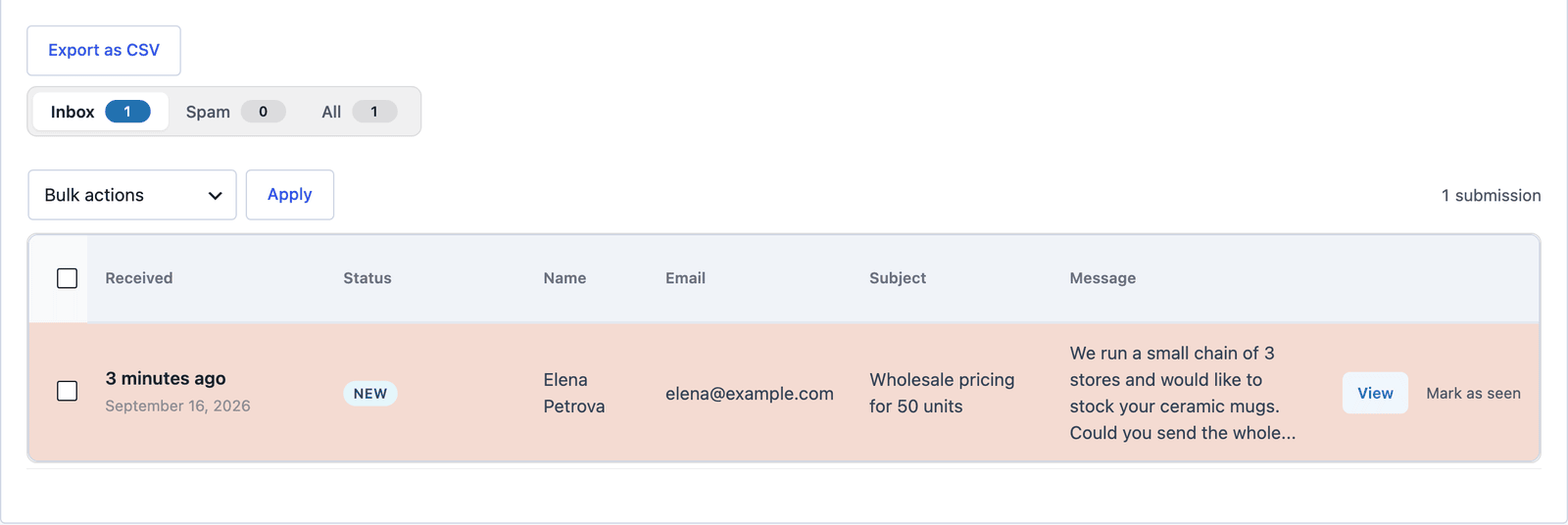 The static site never saw this screen. WordPress did.
Files on your disk. A resume or a receipt is an upload on your host, with the type and size limits you set. Hosted backends that offer uploads at all usually keep them as links with a quota. The contact form with file upload template is the HTML. The file uploads guide is the server-side caution.
Actions that are not a plan upgrade. Admin email, autoresponder, Slack, Sheets, HubSpot, webhooks sit in the same plugin. Formspree puts autoresponses on Professional and the CRM plugins next to them. Web3Forms puts files and webhooks on Pro.
Unlimited volume on a license, not a monthly cap. Core Forms is $59 a year or $249 lifetime, unlimited sites. Web3Forms stops the form at 250 on free. Formspree Free is 50. You still have to send the mail through SMTP. The cap you are not buying is the submissions cap.
What You Take On
WordPress has to stay up. Plugin updates, PHP versions, a firewall, a backup. A hosted endpoint’s whole pitch is that you do not do this.
The origin split is real. Cookies, CORS, captcha keys and “which domain is the form on” need a pass. The headless guide lists the footguns.
And you are the spam desk. Honeypot, rate limits, Turnstile or hCaptcha, Akismet if you use it. Formspree’s Formshield is a product. Your settings are a product you maintain.
If that paragraph feels heavy, keep Web3Forms. A form backend should reduce work. WordPress only reduces work when WordPress is already in the day to day.
A Fair Comparison
| Hosted form backend | WordPress as the backend | |
|---|---|---|
| HTML on a static host | Yes | Yes |
| Setup | One action or access key | Form in WP, then embed, fetch or proxy |
| Storage | Their dashboard, their retention | Your database, your backups |
| Monthly cap | 50 to 250 on typical free plans | Plugin license, not a count |
| Files | Often a paid tier | Your upload dir, your limits |
| Integrations | Tiered plugins | Bundled actions, or a webhook |
| Leave the static host | Keep the same action | Keep the same action |
| Leave WordPress | n/a | You need a new backend |
The HTML form to email post is the generic version of this table. This page is the WordPress column, written out.
The Limits
WordPress is not a drop-in Formspree key. You create the form first, then point HTML at it. People who wanted “paste access_key, done” will feel the extra step, and they are not wrong.
This is also not a claim that every WordPress form plugin works as a public REST backend. Many only accept POSTs from their own rendered pages. If you try this with a plugin that has no documented submit route, you are writing a private API.
I built the Core Forms headless routes to make this path first-class. A Gravity Forms or WPForms site can sometimes be forced into the same shape with add-ons. I am not going to pretend that is the same afternoon of work.
What Quietly Ruins It
Shipping the API key in a public repo and calling it done. Use the proxy on anything that accepts files or paid leads.
Letting the static HTML drift from the WordPress field list. The backend cannot map full_name to NAME unless you tell it. Name the fields once and copy them.
Treating WordPress as “the emailer” and disabling storage to keep the database small. You just rebuilt Web3Forms, including the part where a missed email is an unrecoverable lead.
Final Remarks
A form backend is a POST that someone promised to keep. If that someone is already WordPress, point the HTML there and stop renting a second inbox.
If WordPress is not in the stack, do not install it just to catch a contact form. Use Web3Forms, Formspark or Formspree, and read the alternative posts for the caps.
The interesting case is the common one: a static front, a WordPress back and a form that was posting into space. Give it an URL on your own site. Then open WP-Admin the next time someone asks whether the message arrived.