
Core Forms 4.7
One compact navigation across Forms, Submissions, Core Commerce and Settings, a Form Theme Customizer with four presets, portable JSON export and import for everything, a Customers workspace and a builder that works on a phone. Released July 27, 2026, with five patches through August 15, including the move of licensing and updates to gauravtiwari.org.

Core Forms 4.7 is out as of July 27, 2026. The change most people will notice is the admin itself: Forms, Submissions, Core Commerce and Settings now share one compact navigation, and the builder works on a phone. The second change is a Form Theme Customizer, so styling a form is a screen with presets and a live preview instead of a CSS file.
This post covers the release and the 5 patches through August 15. One of those, 4.7.3, moved licensing and automatic updates to gauravtiwari.org, and it did so without asking anyone to re-enter a key. That note is worth reading even if nothing else here applies to you. Existing forms render as before. The Import menu is now called Migrate, and a per-form Skeleton CSS choice arrived in 4.7.2.
The update is under Dashboard, then Updates, like every release before it. The raw list is in the changelog. If something does not match this post, the support page reaches me.
Before You Update
- The Import submenu is now Migrate. It holds the six third-party importers and the native backup and restore described below.
- The sub-navigation on every Core Forms page changed. Create and management actions moved beside the records they affect, and the global Add Product action is gone from Licenses, Orders and Storefront, where it never belonged.
- The all-submissions card grid is now a list table. Search, sort and bulk actions work the way they do on Posts.
- From 4.7.3, after updating, load any admin page once while the site can reach gauravtiwari.org. The site re-registers its license on that first load. If it cannot reach the server, the key stays as it is and a notice asks you to reactivate later.
- From 4.7.2, a form can override the global Skeleton CSS setting. Existing forms keep their current behavior unless you pick an override.
What’s New in Core Forms 4.7
Five areas changed. The first one is everywhere, and the other four each live on one screen.
One Navigation
Forms, Submissions, Core Commerce and Settings share one product-wide navigation with contextual primary actions, so the button you need is next to the records it acts on. The Actions tab has a searchable action library. The global Settings page has a section index that tracks where you are, single-column responsive fields and a persistent bar that shows unsaved changes and saves them, which also fixes the page overflowing narrow viewports and needing a scroll to the footer before you could save.
The builder was reworked for narrow screens. Transient panels stack instead of clipping the canvas, controls are sized for touch and field actions stay visible without hover. A clear accessibility audit collapses to a one-line status, and the builder now distinguishes its field-only save from the full form save.
Underneath all of it, the admin interface was mapped to a smaller semantic system for action, surface, status, spacing, radius, elevation, focus, tables and mobile behavior. Form lists, selects, checkboxes and responsive tables were reworked against it, with less card-heavy presentation and top-aligned checkboxes in list tables.
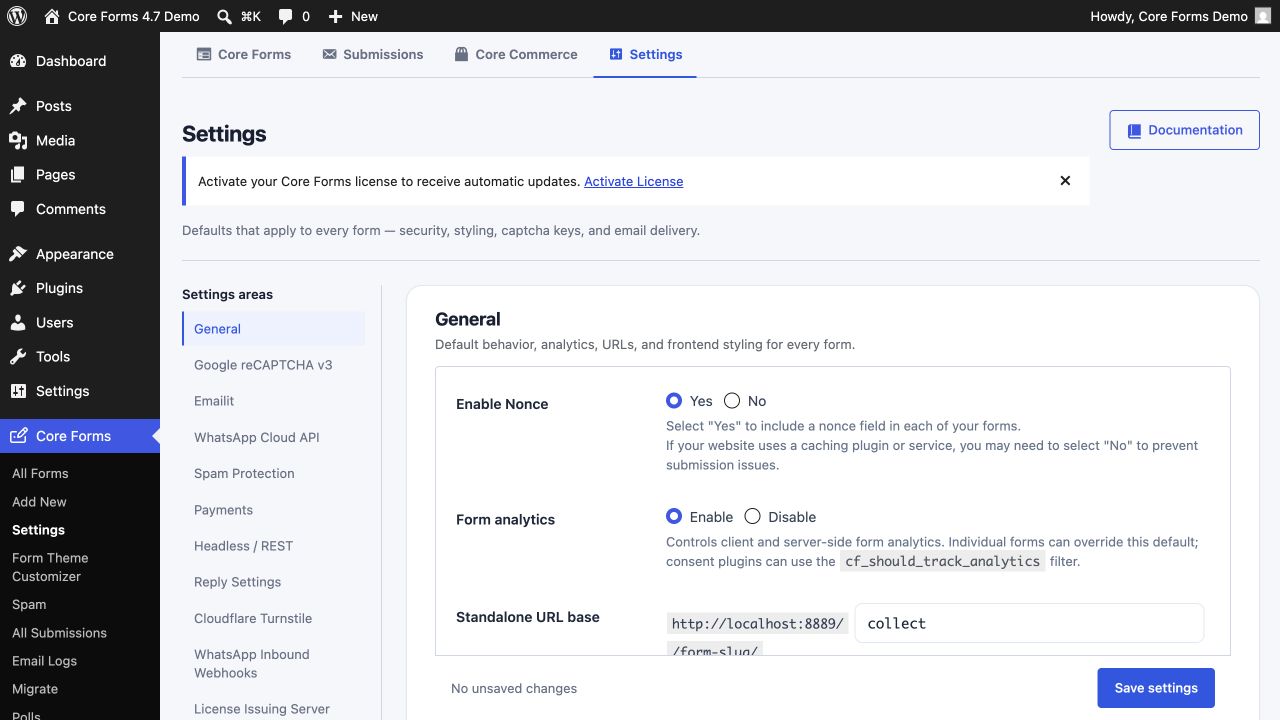 Every settings section is reachable from the index, and the save bar stays in view however far down you scroll.
Form Theme Customizer
Form styling has its own submenu. Four presets, Core Forms, Compact, Warm and High Contrast, sit above token controls for the values that make a theme, with a desktop and mobile preview, live accessibility checks and copyable CSS for anyone who wants to take the result into their own stylesheet.
Every save or restore regenerates a cache-versioned front-end stylesheet, so the theme you see in the preview is the file the visitor gets, with a new version string that gets past page and browser caches.
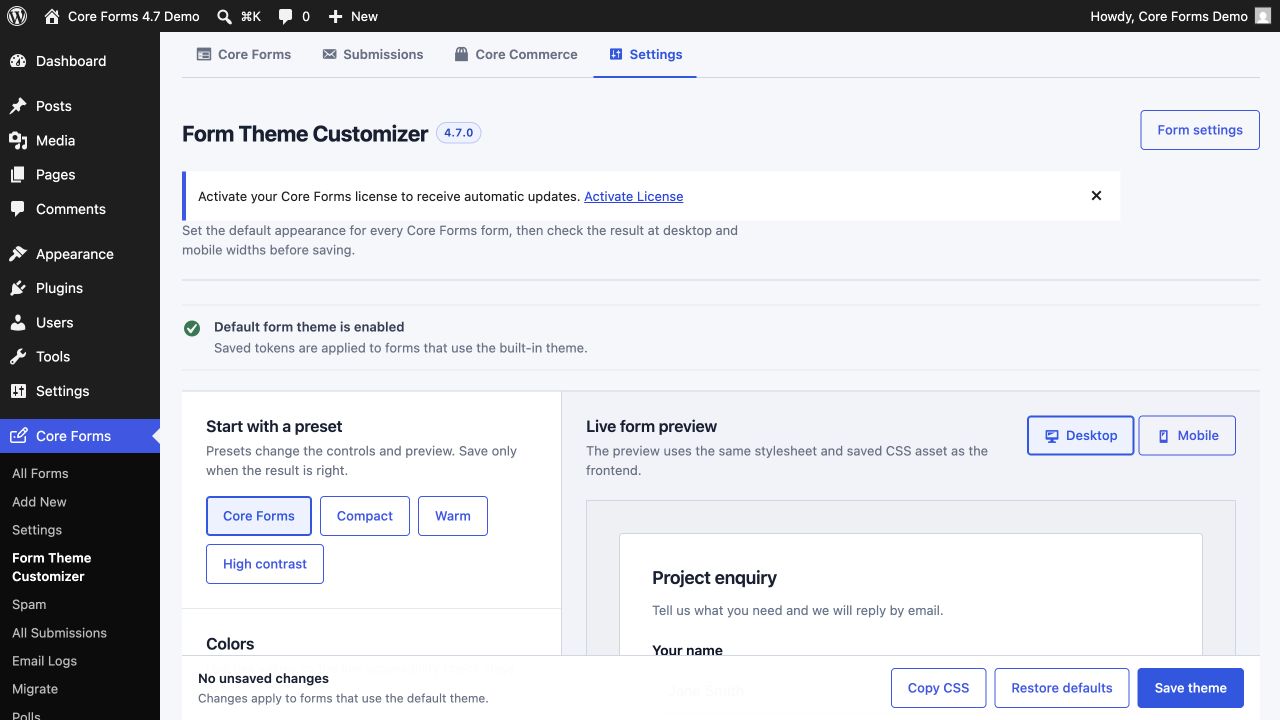 The preview is the same rendered form the front end serves, which is what ended the preset drift between the two.
Portable Export and Import
Under Migrate, a selective JSON export and import covers forms, submissions and replies, polls and votes, settings and theme tokens, activity and analytics, and every Core Commerce record. You choose what goes in. On the destination, the import remaps form, submission, poll, product, order, plan, package and license relationships to the IDs that site assigns, so an order still points at its product after the move.
This is the native backup and restore, and it is why Import became Migrate: the same screen moves data in from other plugins and moves Core Forms data between sites.
Core Commerce Rebuilt
The overview leads with real next actions, compact store totals, unfinished prerequisites and recent activity, and a zero count no longer competes with a warning for attention. Product tables distinguish an active product from one missing pricing or a release, and sample products appear only during onboarding. Creating a product starts with the essential catalog details and defers the optional customer-page mappings until the product exists. A task-oriented Storefront workspace covers publishing.
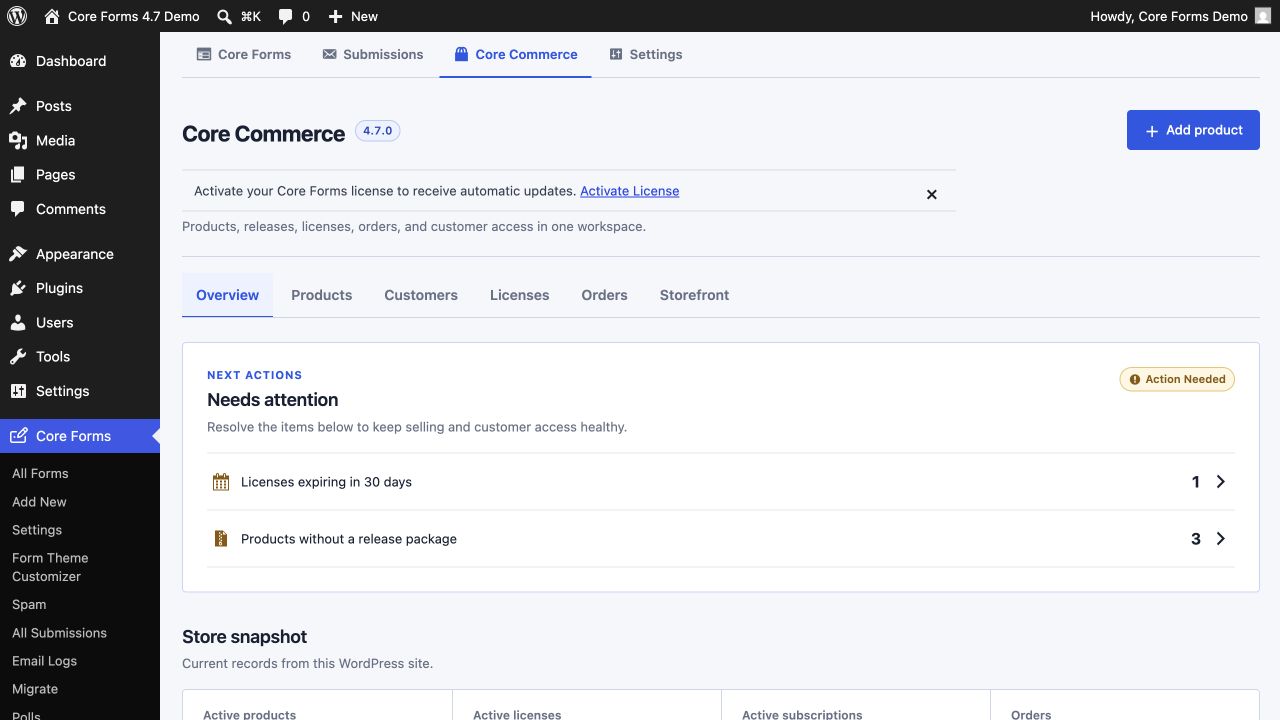 The first thing on the screen is what needs doing, not how many of each thing there are.
A new Customers workspace brings each buyer’s orders, licenses, active sites and latest activity together, matched case-insensitively on email so the same customer typed two ways is one record. Each product workspace now carries block and shortcode guidance specific to that product, with copy controls and plain instructions for building a single-product page, along with a recommendation to use the native blocks in the Block Editor.
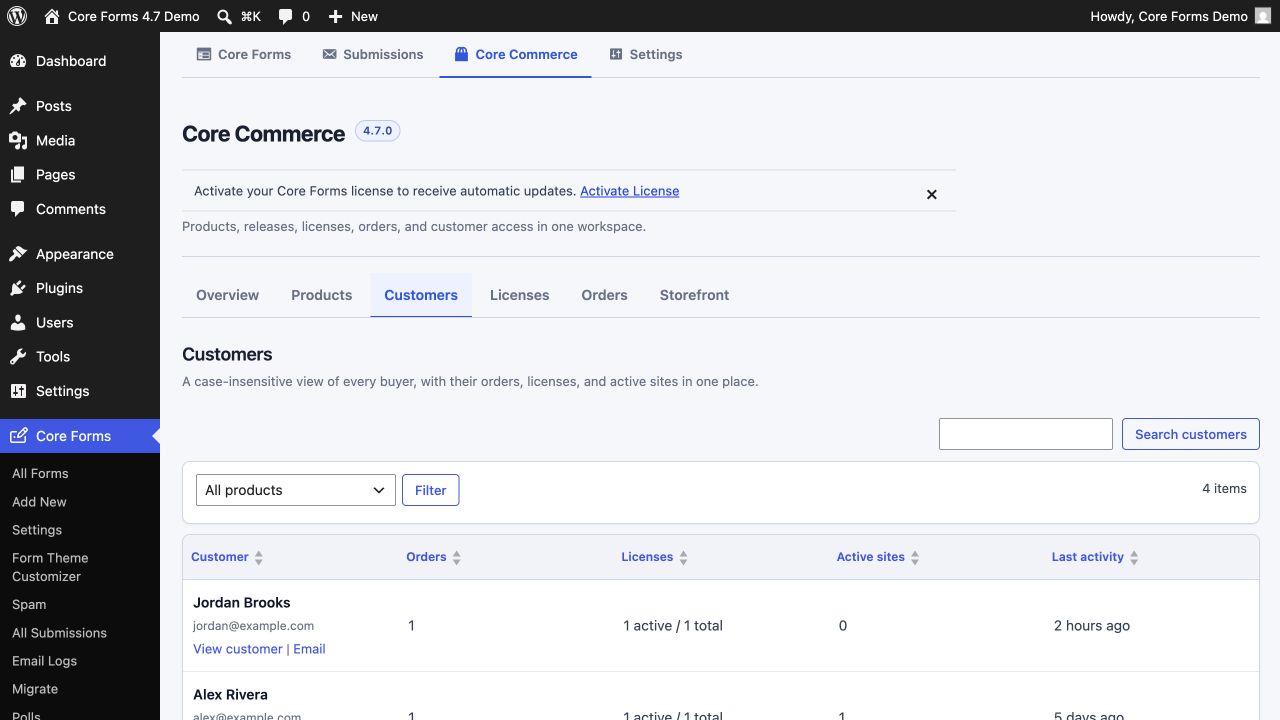 One row per customer, which is the view a support question actually needs.
Submissions as a Table
The all-submissions card grid was replaced with the searchable, sortable WordPress list table, for faster scanning and bulk operations across forms.
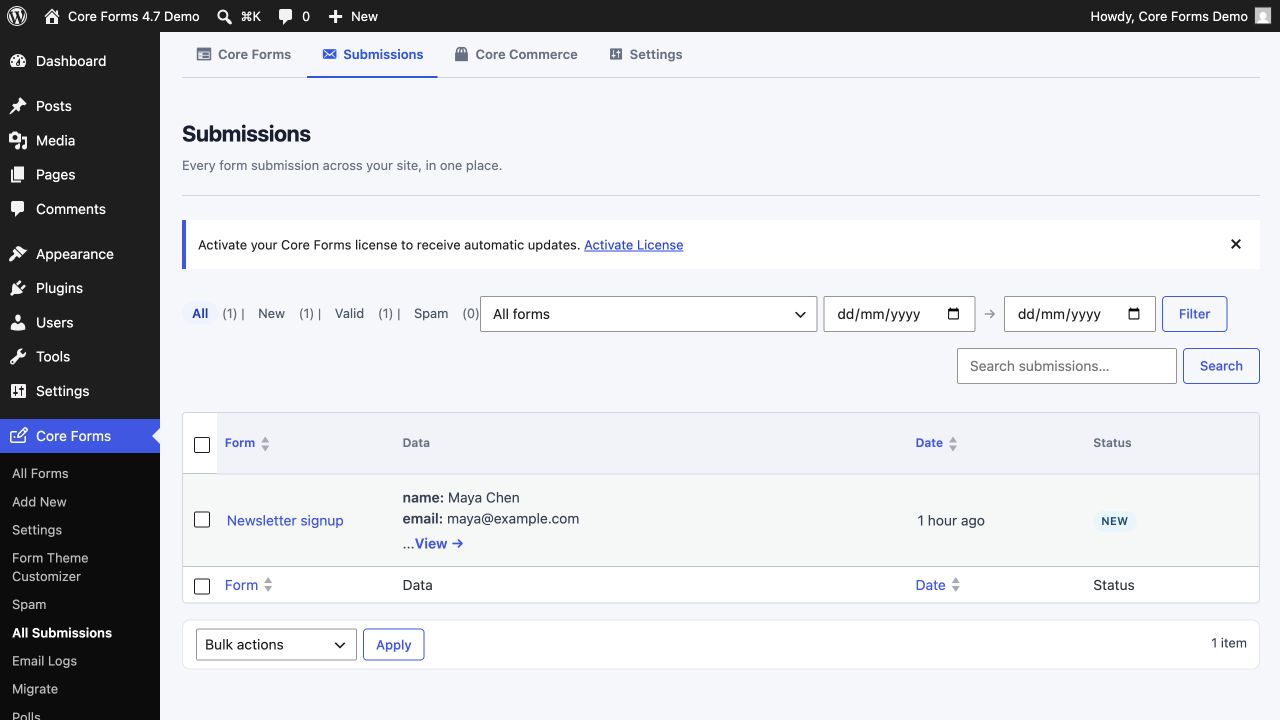 The same table you already know from Posts, so nothing new to learn.
Smaller Changes and Fixes
- Starter-template Preview actions resolved to an unknown template instead of the selected form. Fixed.
- Generated theme presets drifted between the customizer preview and the front end, most visibly on the Warm preset. The select arrow sat on the wrong side in left-to-right layouts, and helper text inherited oversized typography from host themes. All three are fixed.
The Patch Releases
Five patches over 3 weeks. 4.7.3 is the one every site went through.
4.7.1
July 28, 2026. Standalone and fullscreen pages rendered browser-default controls when the global or per-form built-in theme was off. Those routes now always load the Core Forms design baseline and the generated theme-token overrides, because the active theme is not rendered on those pages and there is nothing else to style them. The default form theme declares the core stylesheet as a dependency so its layout primitives are always present, and regression coverage guards the standalone asset loading.
4.7.2
August 4, 2026. A per-form Skeleton CSS control with three options: inherit the global setting, always load forms.css, or always skip it. The editor preview follows the same resolved setting as the front end. Existing forms keep their behavior unless an override is chosen.
4.7.3
August 14, 2026. Licensing and automatic updates now run through FluentCart on gauravtiwari.org instead of License Forge on core-forms.com, which makes gauravtiwari.org the home for every Core Forms license. Existing keys are unchanged. A site upgrading from an earlier release re-registers itself against the new server on the first admin page load, swapping the activation hash without anyone re-entering a key. If that call fails, the key is left untouched and the existing notice asks for reactivation, so an outage cannot clear a working license.
License checks retry once on a timeout or a server error, so a brief network problem no longer marks an active license invalid, and a business failure from the server, expired or activation limit reached, shows the server’s own message instead of a generic one. Stray working images left in the plugin root are no longer swept into the distribution ZIP.
4.7.4
August 14, 2026. The native FluentCRM action now sends the configured double-opt-in confirmation email after attaching lists and tags when a form adds a contact as Pending. Existing subscribed or suppressed contacts are left unchanged and are not force-resubscribed.
4.7.5
August 15, 2026. Schema-rendered field IDs are unique per form instance, so when the same form is placed twice on a page, clicking a label focuses the right input and a screen reader announces the right description. The MailerPress action defaults to double opt-in, preserves existing subscribers and suppressed contacts, records the form, submission and timestamp behind each consent, and resends a confirmation only when a pending or previously unsubscribed contact submits again. The legacy FluentCart-to-MailerPress bridge no longer creates subscribed contacts when its settings are empty; configured, it only classifies contacts that already exist in MailerPress and preserves their status.
The Limits
One theme per site. A form can opt out of the theme, and from 4.7.2 out of the skeleton too, but it cannot pick a different preset from the form next to it.
The license move in 4.7.3 needs one admin page load while the site can reach gauravtiwari.org. A site that blocks outbound requests shows the reactivate notice until it can.
The builder on a phone is for a quick fix. Building a 40-field form is still a desk job, and the code editor is often the faster route on a small screen.
Docs and Links
- Core Forms 4.7 in the changelog, with the five patches beneath it.
- The admin workspace and the Form Theme Customizer.
- Moving Core Forms data between sites and portable migration.
- Customers, orders and activated sites and product pages, blocks and shortcodes.
- License keys and automatic updates, for what changed in 4.7.3.
- The previous release, Core Forms 4.6.
Final Remarks
If you have updated, every Core Forms screen reads like one product instead of four, the theme you preview is the theme that ships, and your data can leave the site in a file and come back on another one. The idea to keep is the one from the license move: a change on the vendor’s side should cost the customer nothing, and 4.7.3 was built so that it did.
Three things are worth a minute after the update. Open the admin once and check for a license notice, because that is the moment the re-registration happens. Export a portable backup before the next big change to a form, since the file is small and the restore is a click. And pick a theme preset and read its accessibility check before touching a single token.
The admin workspace guide covers the new navigation, and the support page is there if the re-registration notice will not go away.
That is all for 4.7. I hope it feels like one plugin now.