
Schema discovery
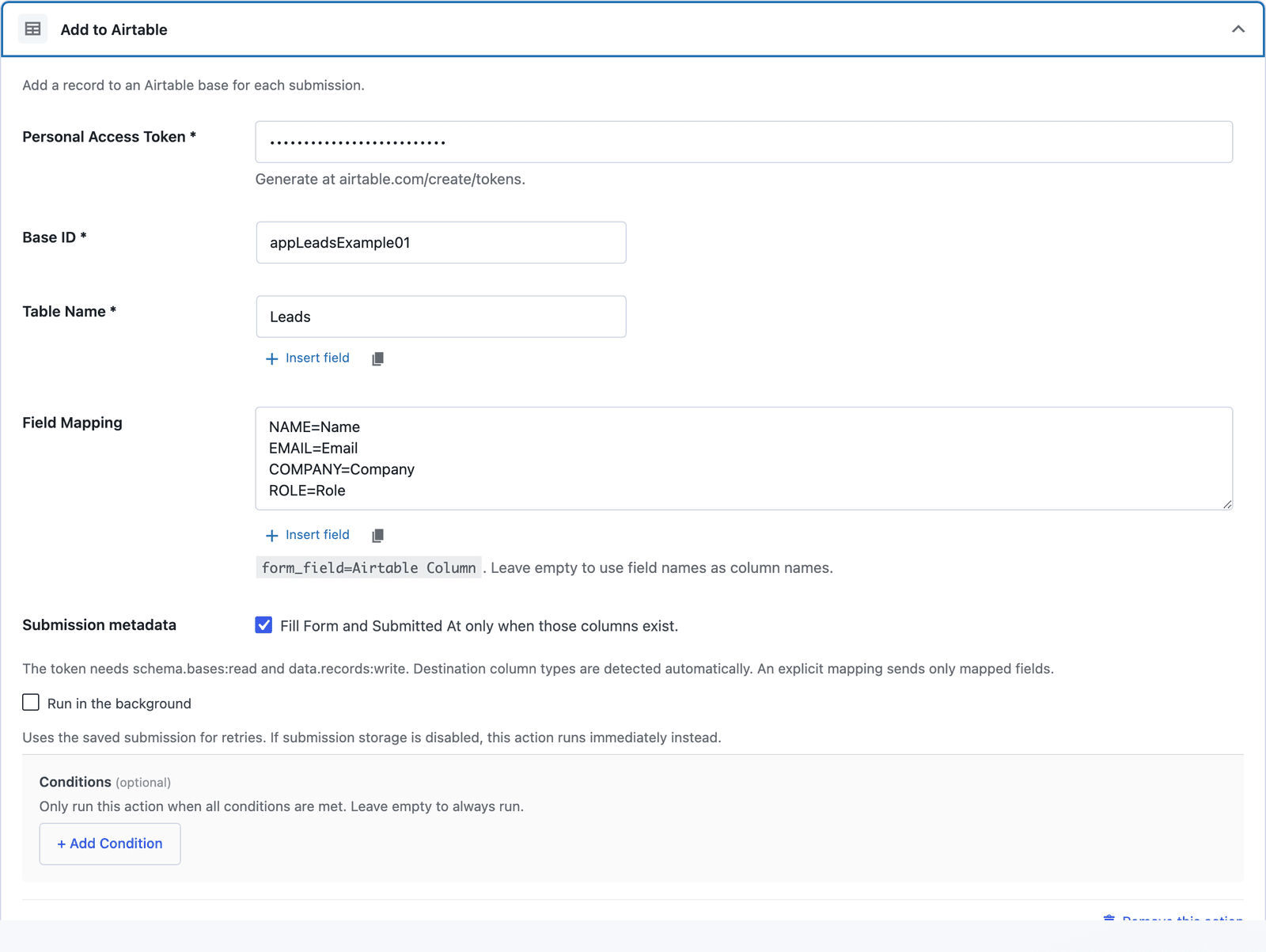
Enter a base ID and table name or ID. The action reads its field types.
Productivity & workspace
Create Airtable records using the destination’s field types.
Bundled with Core Forms, the WordPress forms plugin with every premium feature in the box. No add-on tax.
Core Forms reads your table schema and converts mapped values to the correct Airtable types. It sends numbers and checkboxes as native values and multi-select fields as arrays.
Enter a base ID and table name or ID. The action reads its field types.
Map text, email, URL, phone, numbers, dates, checkboxes, selects, and record-ID links. Attachments and computed fields are not included.
Form and Submitted At are populated only when enabled and those columns exist.
Grant schema.bases:read and data.records:write for the destination base.
Enter the base ID and table name or ID.
Use form_field=Column Name, or match existing column names automatically.
Want the long version? Read the step-by-step guide with screenshots of every setting.
Airtable and every Core Forms-built integration on this site are included with your
license.
Use code CFLAUNCH for 20% off either plan. Ends September 30, 2026 (IST).