
How to Create a Poll in WordPress
Create a WordPress poll with single or multiple choice answers, vote limits, a closing date and live results, then embed it with a shortcode or block.

A poll is the smallest piece of feedback you can ask a visitor for: one question, a few answers and a result they can see straight away.
I build Core Forms, and polls ship inside it with their own editor, separate from the form builder.
Every poll has its own audience, so one guide cannot tell you what to ask. But the setup is the same every time, and in this one I will walk through each tab of the poll editor in the order you will use them.
Everything below comes from a test poll that asks which day works best for a monthly webinar. If you get stuck along the way, support is a message away.
Poll or Survey
A poll suits one question where the crowd’s answer is the point. A survey suits several questions where each person’s answers matter on their own.
- Use a poll for a quick vote: a webinar day, a feature name, a topic for the next post.
- Use a form when you need free-text reasons, contact details or questions that depend on earlier answers.
Core Forms keeps the two apart on purpose. A poll has vote limits and live results, and a form has submissions, email actions and conditional fields. Picking the wrong one means fighting the tool, and the guide to creating a survey in WordPress covers the form side.
Create the Poll
The poll editor has 5 tabs, and only the first one is required. Start here:
- Go to Core Forms > Add Poll.
- Give the poll a title. Visitors never see it, so name it for yourself.
- Write the question in the Question box.
- Choose Single choice (radio) or Multiple choice (checkboxes).
- Type at least 2 answers. Pressing Enter in the last answer adds the next one, and the handle on the left reorders them.
- Tick Allow an “Other” write-in option if people should be able to type their own answer.
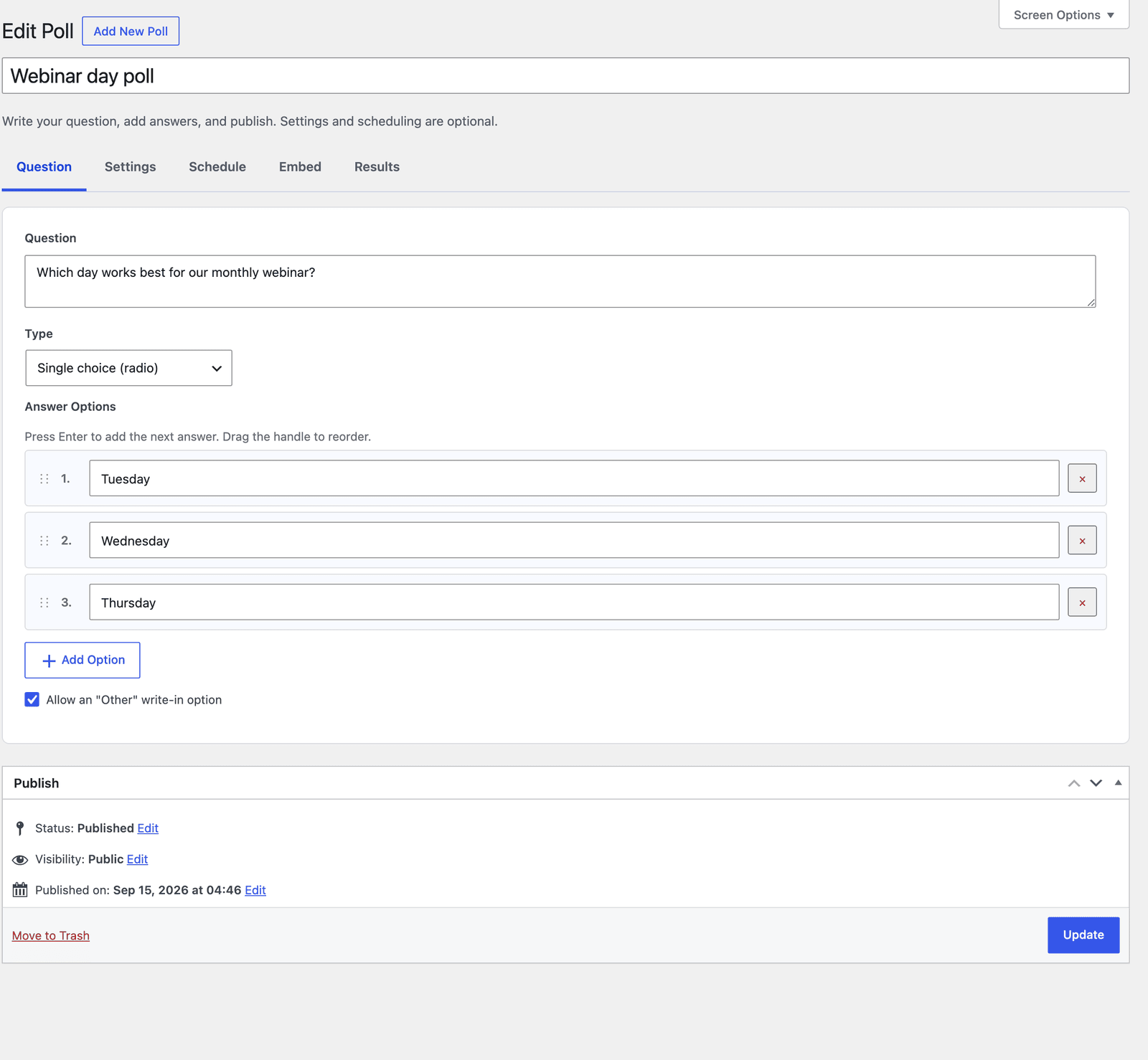 The Publish box sits under the tabs, so edits in every tab save together.
Multiple choice is the right type when people can honestly like more than one option, such as topics for future posts. For a decision like a meeting day, single choice forces a real preference and gives you a clearer winner. If you need questions to start with, the fun multiple-choice survey questions list has 60 with the options written out.
Choose Who Can Vote
The Settings tab decides how the poll counts votes and what voters see. The vote limit is the setting that matters most:
- By IP + cookie is the default and the sensible choice for a public poll.
- By user account (login required) ties each vote to a signed-in user and rejects anonymous votes entirely.
- By cookie only is the lightest check, and clearing cookies gets around it.
- No limit (every vote counts) fits a live event where you want every tap counted.
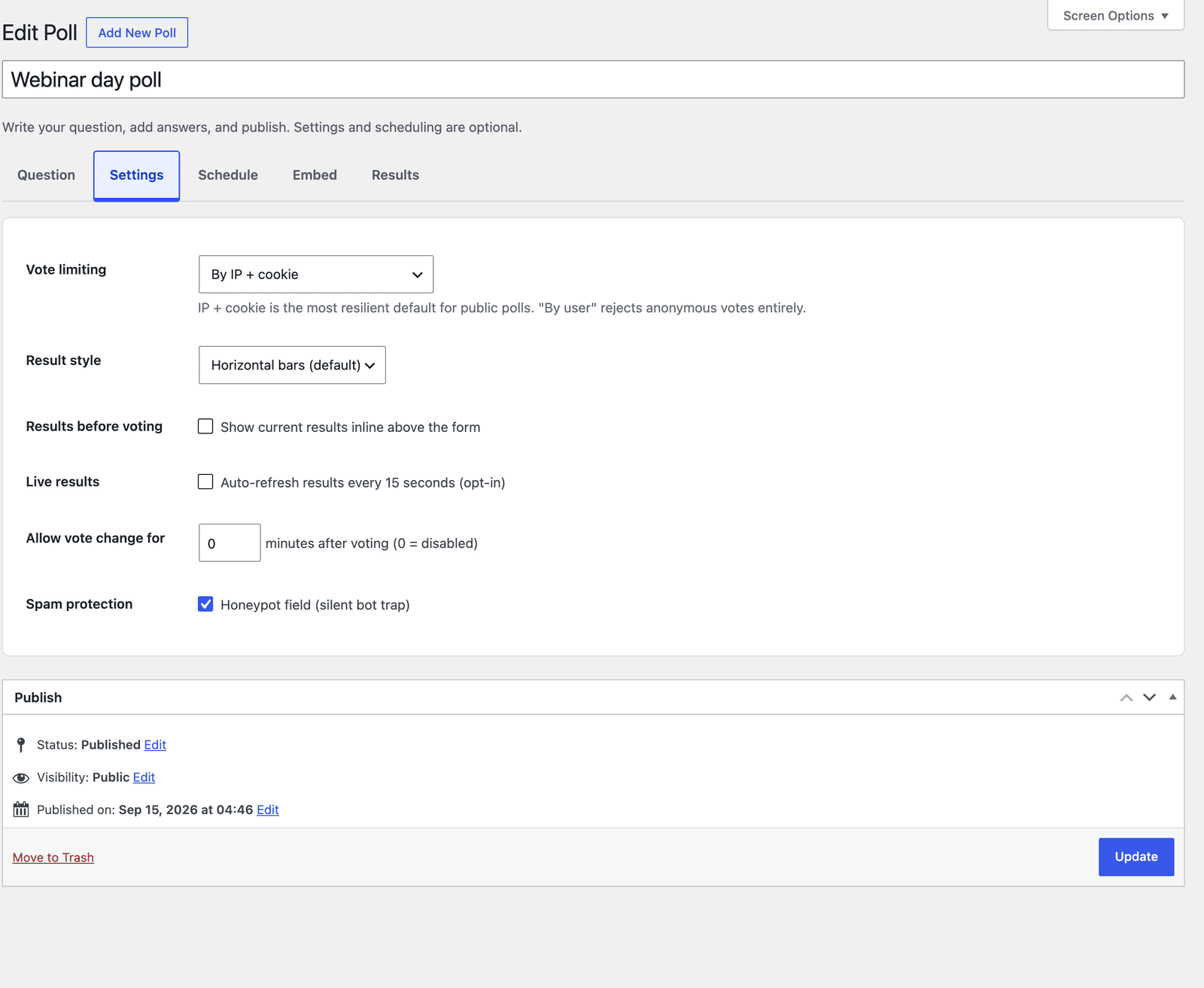 A vote change window of 0 minutes means the first answer is final.
The rest of the tab shapes the result:
- Result style shows horizontal bars, vertical columns or percentages only.
- Results before voting shows the current tally above the form. That can nudge people toward the leading answer, so it is off by default.
- Live results refreshes the tally every 15 seconds for people watching the page.
- Allow vote change for gives voters a set number of minutes to change their mind.
- Spam protection adds a hidden honeypot field that bots fill in and people never see.
For a members-only community or a staff poll, the account option is the only one where one vote means one person. Everywhere else, the default is fine.
Schedule Voting
The Schedule tab opens and closes voting on its own, which saves you from remembering to do it at midnight.
- Status switches voting between active and closed by hand.
- Open at shows an “opens at” notice until the chosen time.
- Close at ends voting after the chosen time.
- When closed shows the final results, hides the poll or shows a notice with a link.
- Redirect URL is the link used by that notice.
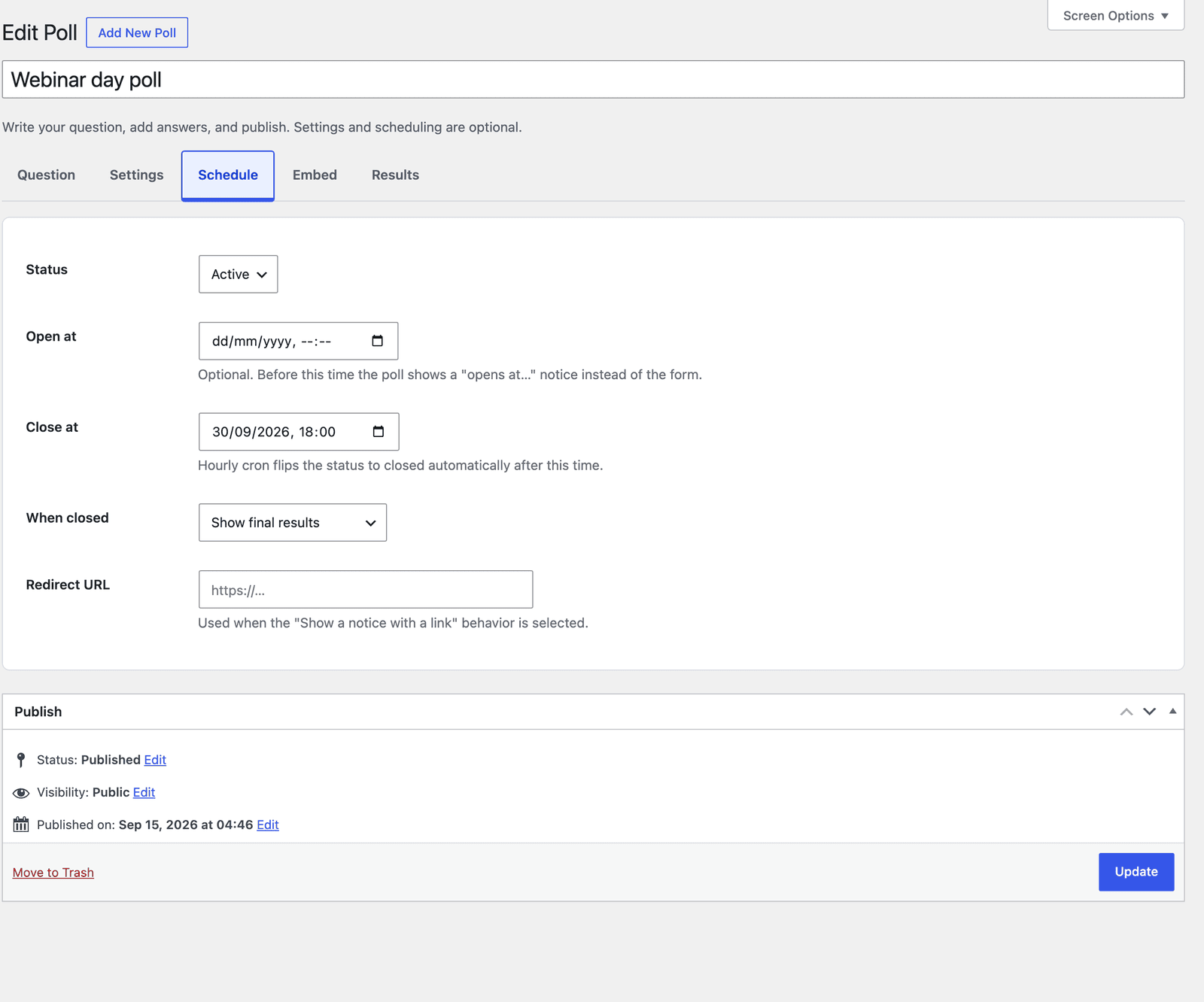 Showing the final results after closing turns the poll into an announcement.
WordPress publishing status and voting status are separate. A published poll can be closed, and closing it keeps every vote.
Embed the Poll
The Embed tab gives you two shortcodes and points to the block. Paste either shortcode into a post, a page or a text widget:
[cf_poll slug="webinar-day-poll"]
[cf_poll slug="webinar-day-poll" results="1"]
The first one shows the poll. The second one shows only the results, which is useful on a recap page or in a follow-up post after voting closes. In the block editor, search the inserter for “Core Poll” and choose the poll from its dropdown.
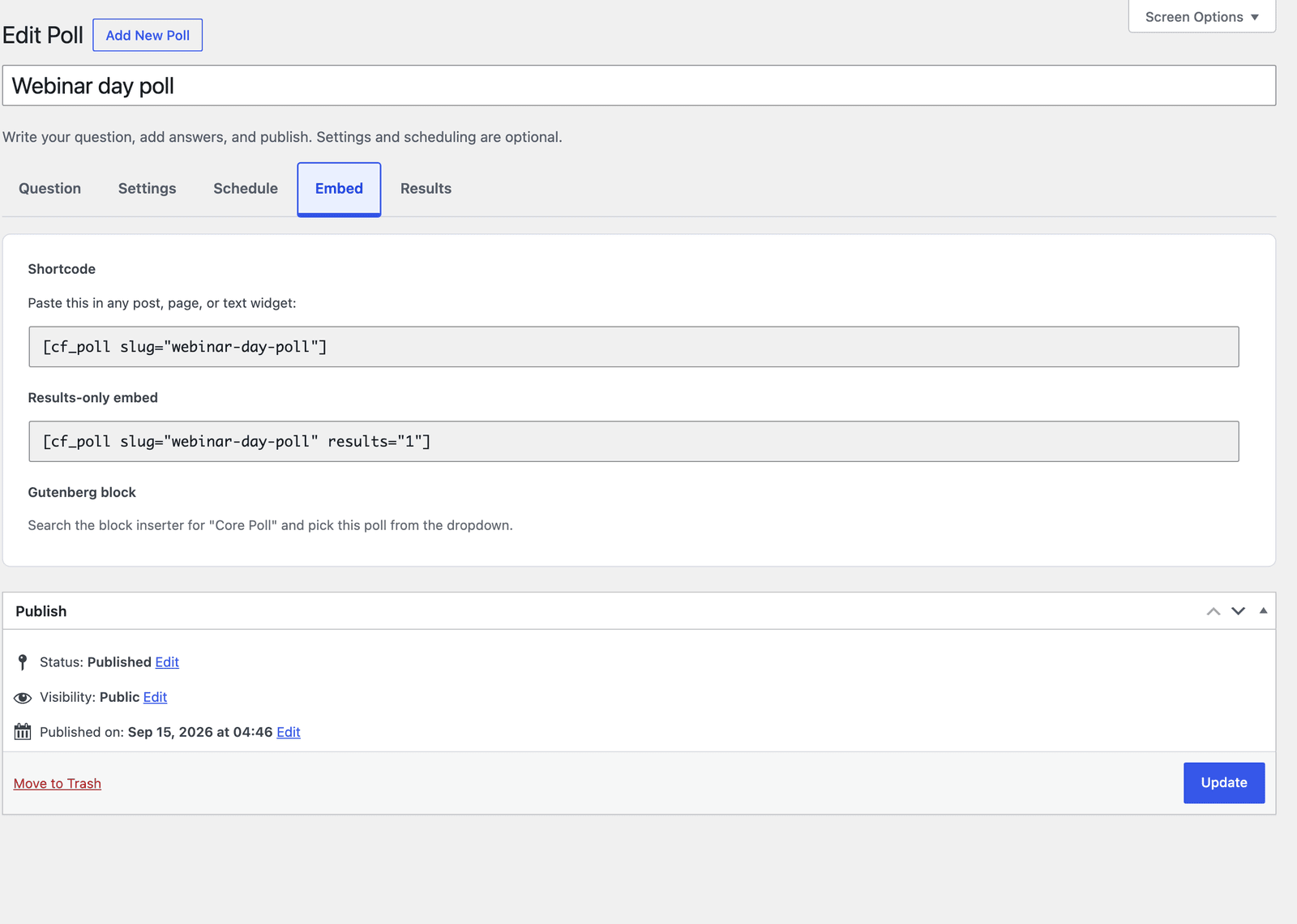 Both shortcodes point at the same poll, so a recap page stays in sync with the live vote.
On the page, the poll picks up a clean card layout with each answer as a large tap target:
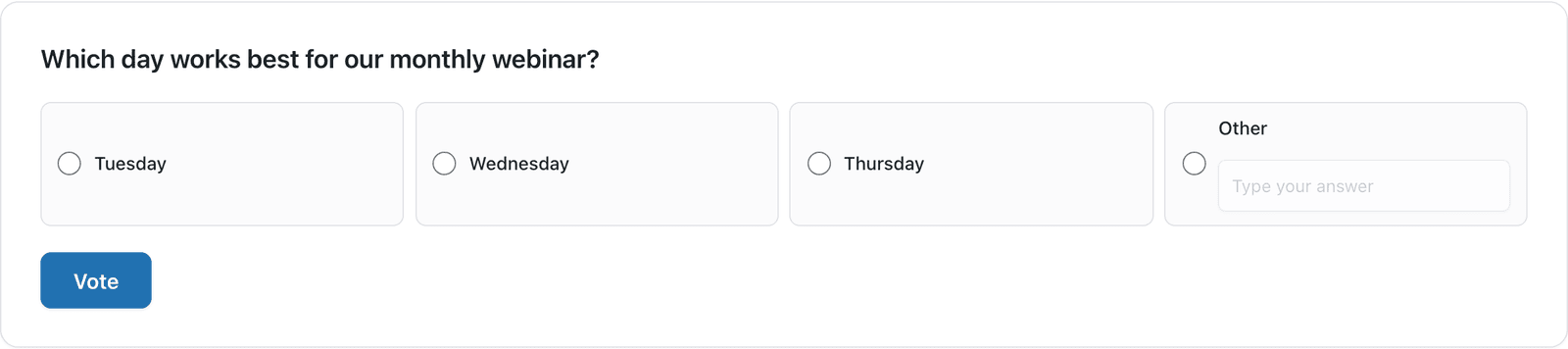 The Other option opens its own text box, so write-ins need no separate field.
Read the Results
The Results tab shows the total votes, the number of unique voters and a bar for each answer with its count and percentage.
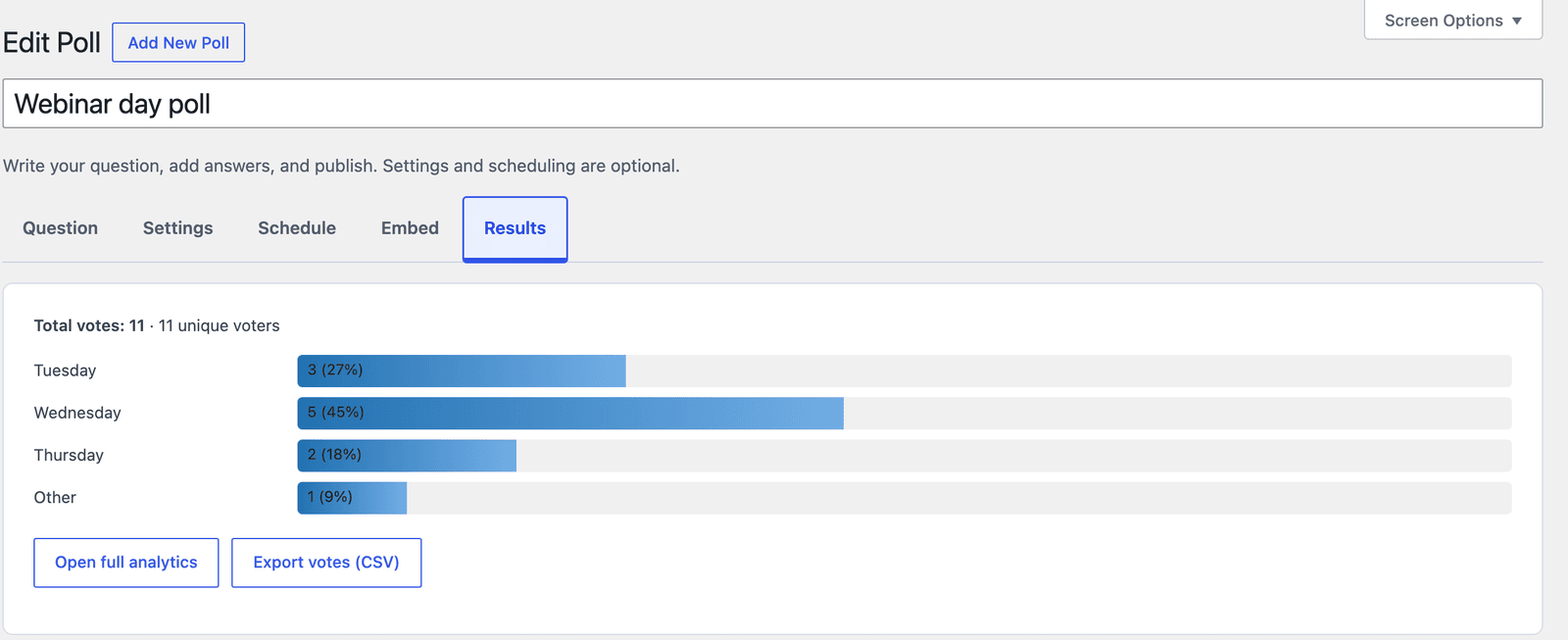 Wednesday won this test poll with 5 of 11 votes, well clear of Tuesday’s 3.
Two buttons sit under the bars. Open full analytics opens the fuller report, and Export votes (CSV) downloads every vote for a spreadsheet.
A few details make the numbers easier to read:
- Other groups every write-in answer into one row, so the counts always add up to the total.
- That row shows how many people wrote in, not what they typed. The actual answers, like the Friday in this test poll, are in the CSV export.
- Each percentage is rounded on its own, so the column can add up to 99% even when every count is right, as it does here.
- In a multiple-choice poll, total votes counts selections and unique voters counts people, so the two numbers differ.
The Limits
A poll asks exactly one question. If you need a reason behind a vote, or a second question that depends on the first answer, you need a form instead.
Public vote limits slow repeat voting down but do not stop a determined person. A new browser, a cleared cookie or a different network can produce another vote, so only the account option gives you a strict one person, one vote count.
The automatic close runs on an hourly schedule, so a poll set to close at 18:00 can stay open until the next hourly check. If a result has to be final at an exact minute, close the poll by hand with the Status setting.
A poll only hears from the people who see it. The result tells you what your visitors picked, not what your whole audience thinks.
What Quietly Ruins a Poll
Offering an answer for everyone. Five near-identical options split the vote until nothing wins, and the result tells you less than a clean 3-way choice would have.
Turning on results before voting for a decision that matters. People see the leading answer before they choose, and a poll about a real decision becomes a poll about which answer was ahead when they arrived.
Leaving live results on for a poll that runs for weeks. Every open tab asks the server for fresh numbers every 15 seconds, which buys nothing on a poll that moves by a few votes a day.
Asking before the answers are real options. A poll about a webinar day you cannot actually move to Thursday tells people their vote mattered when it did not, and they remember that at the next poll.
Reading only the Other count. The row says how many people wrote in, but the ideas themselves sit in the CSV export, and those are often the best answers in the poll.
Final Remarks
You now have a poll that limits repeat votes, closes on schedule and keeps its results on your own site, without a separate WordPress poll plugin to maintain. The one idea worth keeping from this guide is that a good poll is a narrow poll: one clear question and a handful of answers that do not overlap.
The polls feature page has a short tour of the editor, and the support team can help if a setting does not behave the way this guide describes.
I hope your first poll settles the question you had in mind.
The single-choice and multiple-choice settings map to radio buttons and checkboxes, and the radio versus checkbox explainer covers which to pick when.
FAQ
Can visitors see the results before they vote?
Only if you turn on Results before voting in the Settings tab. By default, people see the tally after they vote.
Can I let people change their vote?
They can if Allow vote change for is set to a number of minutes. After that window, the vote is final.
Can one person vote more than once?
With the default IP and cookie limit, repeat votes are blocked for ordinary visitors but not guaranteed against. By user account requires a login and allows one vote per account.