
Core Forms 4.10
Core Forms 4.10.2 adds a clearer submissions inbox, reusable actions, easier Telegram setup and direct upgrades from License & Updates.

Core Forms 4.10 is out as of September 15, 2026. The biggest change is in Core Commerce: you can sell a service or an event with delivery details that fit what the customer is buying, and give them a customer account for what happens after checkout.
I recommend this update even if you only use forms. It fixes a submission detail crash affecting checkbox answers with an empty optional email, restores missing submission headings and makes fullscreen surveys easier to use. Existing forms don’t need rebuilding, and existing license keys stay intact.
The update is available through Dashboard > Updates with an active Core Forms license. The full changelog covers the complete release, and support is available if something in your setup needs a closer look.
Core Forms 4.10.2
Core Forms 4.10.2, released September 17, 2026, makes submissions easier to scan and actions easier to reuse. If you use Telegram notifications or your WordPress timezone is outside UTC, this patch also fixes two problems you could see immediately after submitting a form.
- Mailchimp API: A separate Subscribe to Mailchimp (API) action connects directly with your API key and audience ID. The existing MC4WP-based action stays available. See the API setup guide.
- Forms overview: Sort by submission count or accessibility issues, with native WordPress table styling and 50 forms per page. All editor-tab shortcuts, including Actions and Analytics, remain beneath each form.
- Submissions inbox: Sender details, answer previews, status filters and local dates help you find an entry without opening every row. Per-form lists offer Summary and All fields views.
- Accurate times: A newly submitted form no longer appears hours old. Date filters use the calendar day in your site’s timezone.
- Import actions: Choose Import Actions beside Active Actions, find a source form and select the saved actions you want. Review missing-field warnings and connections, then save the destination form.
- Telegram setup: Verify your bot, find recent chats and topics, choose HTML or plain text, and send a sample message. If Telegram upgrades a group to a supergroup, Core Forms follows the new destination and updates the saved chat ID after delivery succeeds.
- License & Updates: See the last successful release check, upgrade directly when a newer release is available, and open release notes or support from dedicated cards.
- Clearer analytics: Consistent cards, distinct metric colors and field-interaction bars make activity easier to compare. A single day of activity now shows visible points on the chart.
- Template fixes: Resume upload help reflects the current limit, donation pledges say Send my pledge, and submit controls no longer create empty submission columns.
The Telegram guide walks through connecting a bot. The actions guide explains copying and reviewing workflows. Existing forms and submissions remain intact.
Core Forms 4.10.1
Core Forms 4.10.1, released September 15, 2026, adds Intelligent Inserter and fixes the action editor. I recommend this patch if you configure workflows or frequently edit form actions, because repeated saves could previously add unintended unknown-action cards.
Intelligent Inserter
You can now search for the information you want to collect without knowing the input type. Typing website finds Website / URL; mobile finds Phone; surname finds Last Name. The selected field arrives with its label, a meaningful field name and the appropriate browser autofill settings.
The dedicated contact presets include:
- Name and Full Name: Separate single-line text fields named
nameandfull_name. - First Name and Last Name: Inputs with given-name and family-name autofill.
- Phone and Postal Code: Controls that preserve international prefixes, letters and leading zeros where appropriate.
- Company, Job Title and address parts: Ready-configured fields that remain editable in the inspector.
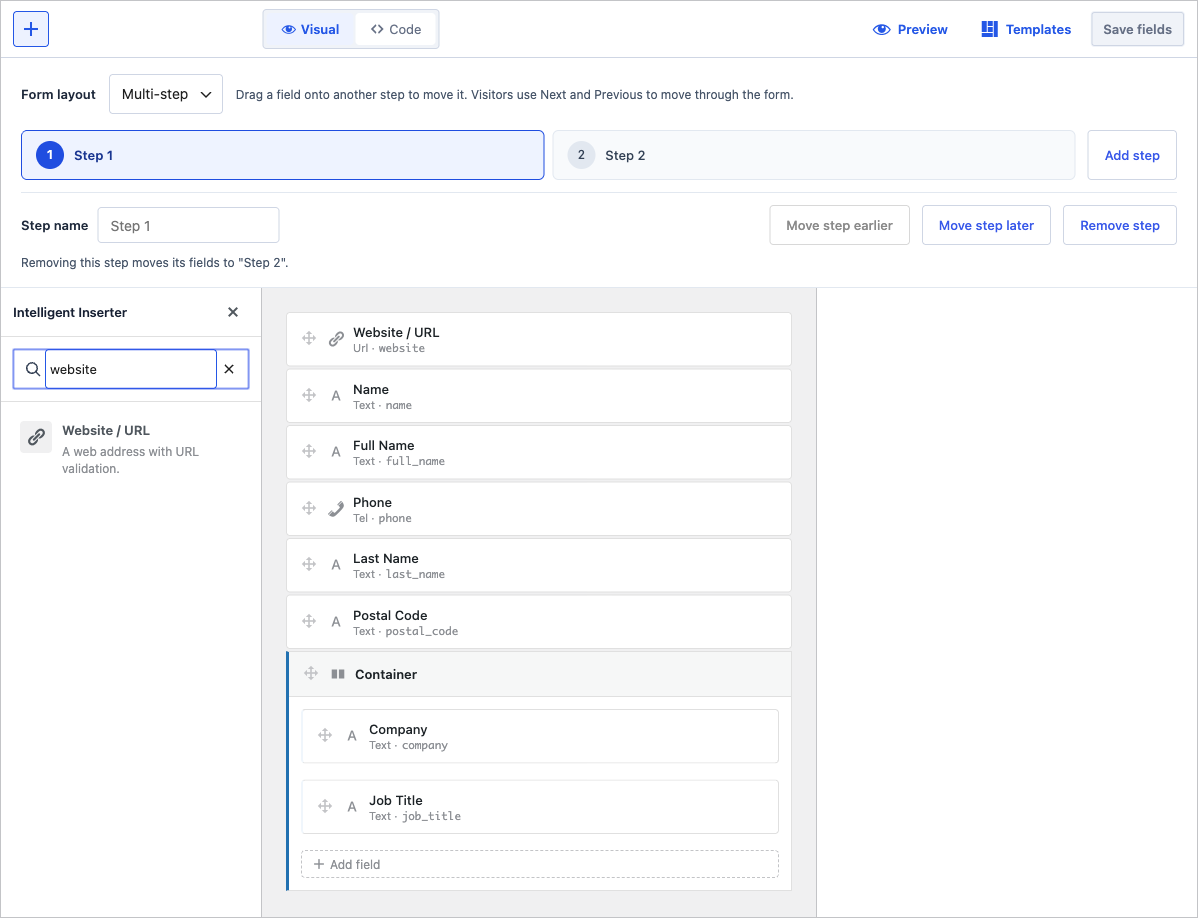
The same searchable inserter works at form level and inside a container. It keeps existing field names intact.
The Intelligent Inserter feature page covers the available presets and keyboard controls. Email keeps its existing required default; the new contact presets are optional until you choose otherwise.
Action Editing
The action editor now offers searchable field choosers beside settings that accept form values. Exposed-field lists accept several selections before you choose Done, while message fields receive tokens at the cursor. JSON mappings handle the token’s quotes appropriately.
The reliability fixes cover:
- Repeated saves: Action templates no longer leak their inputs into the saved form. Blank and unknown cards stop accumulating; genuinely unavailable integrations retain their settings.
- Copy controls: Hook and field controls copy their exact values. Changing the FlowMattic scope updates the displayed hook immediately.
- Test samples: Examples use the current form’s exact names and preserve checkbox arrays. A successful FlowMattic test displays the selected payload passed to its hook.
- Recipient routes: Controls align in a compact table on desktop and stack with labels on mobile. Empty placeholder rows do not accumulate after saving.
- Available variables: Field and system tokens have matching insertion and copy controls.
A successful FlowMattic dispatch confirms the hook ran. Its later workflow steps still need to be checked in FlowMattic. Test actions remain real requests, so use appropriate sample values and recipients.
Before You Update
Core Commerce has its own activation and settings. Updating Core Forms does not mean you need to start using its store features. If you already sell through another plugin, your existing store can continue to do that job.
For sites using Core Commerce, these are the settings worth checking after the update:
- Store setup: Open Core Forms > Core Commerce. An inactive store has an activation screen; an active store has its setup checks and product workspace.
- Checkout page: Core Commerce uses its own checkout page and rejects a page assigned to another store or containing mixed checkout content. The setup repair action helps resolve that conflict.
- Payment settings: Commerce settings link to the shared payment settings. A paid plan still needs a working payment connection before customers can buy it.
- Customer page: Confirm the assigned account page contains the customer dashboard and that your support URL points to the right place.
A current backup is sensible before any plugin update. Afterward, a submission through your important forms and a test purchase through any active checkout will tell you more than the version number in the Plugins screen.
What’s New in Core Forms 4.10
The new Commerce work focuses on the product details and the customer experience around a purchase. It also keeps the distinction between selling software and delivering a service explicit.
Service and Event Products
Service and Event are now product types under Core Commerce > Products > Add product. A consultation shouldn’t need a software version or an activation limit just to describe what someone is paying for. Choosing the product type now brings forward the relevant fields.
For a service, the editor includes:
- Service duration: The session length in minutes, or
0when there isn’t a fixed duration. - Delivery timeframe: A plain description of when the customer should expect the work.
- Scheduling URL: The link a paid customer uses to arrange a time.
- After-purchase instructions: The details they should receive after payment.
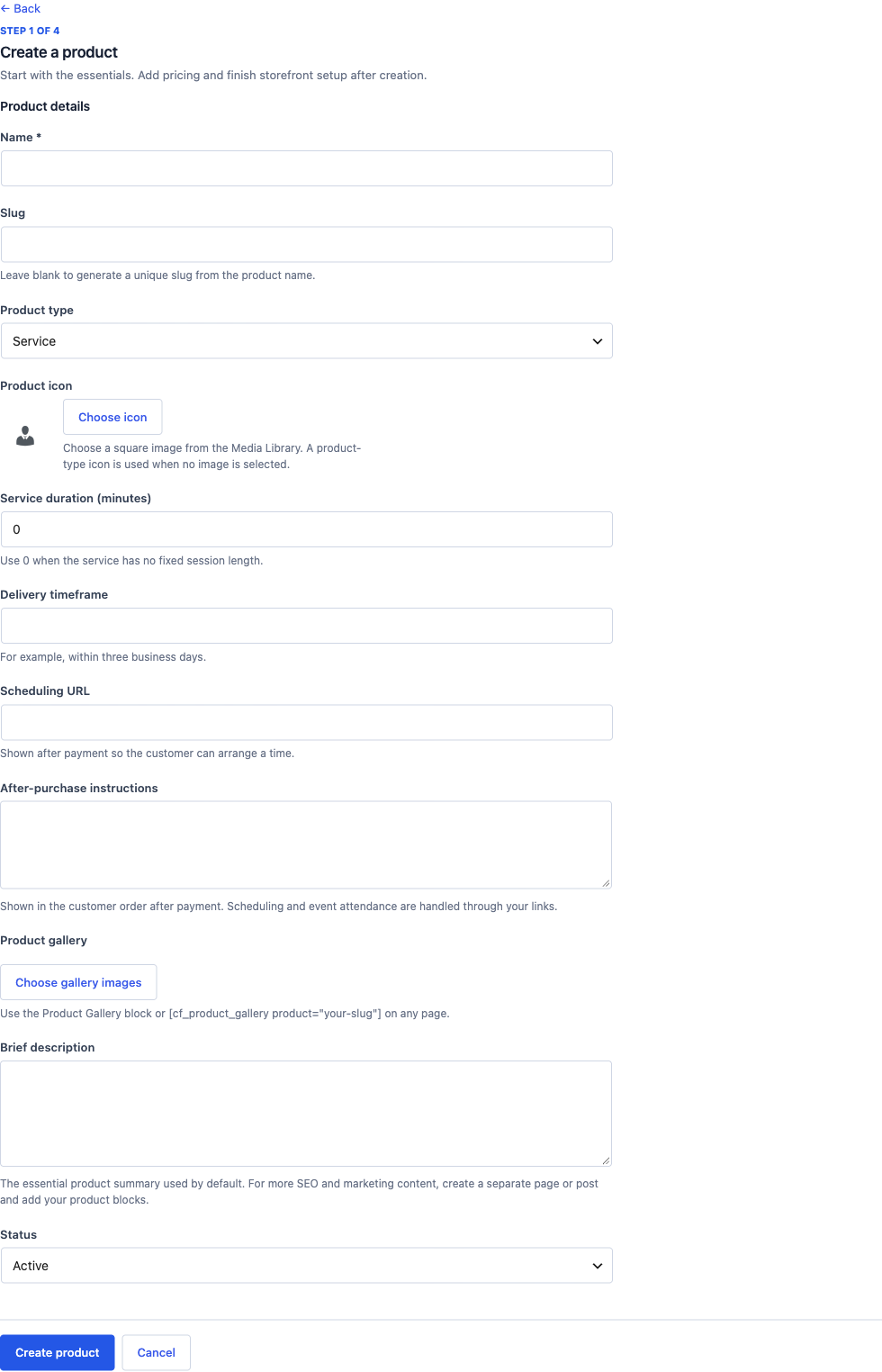
The service fields describe the work and its delivery; customers don’t receive a software license key for it.
An event has its own fields for the date and access details:
- Start and end: The event’s scheduled times.
- Time zone: The zone those times use.
- Venue or online platform: Where the event takes place.
- Event access URL: The link shown in paid order details, rather than on the public product page.
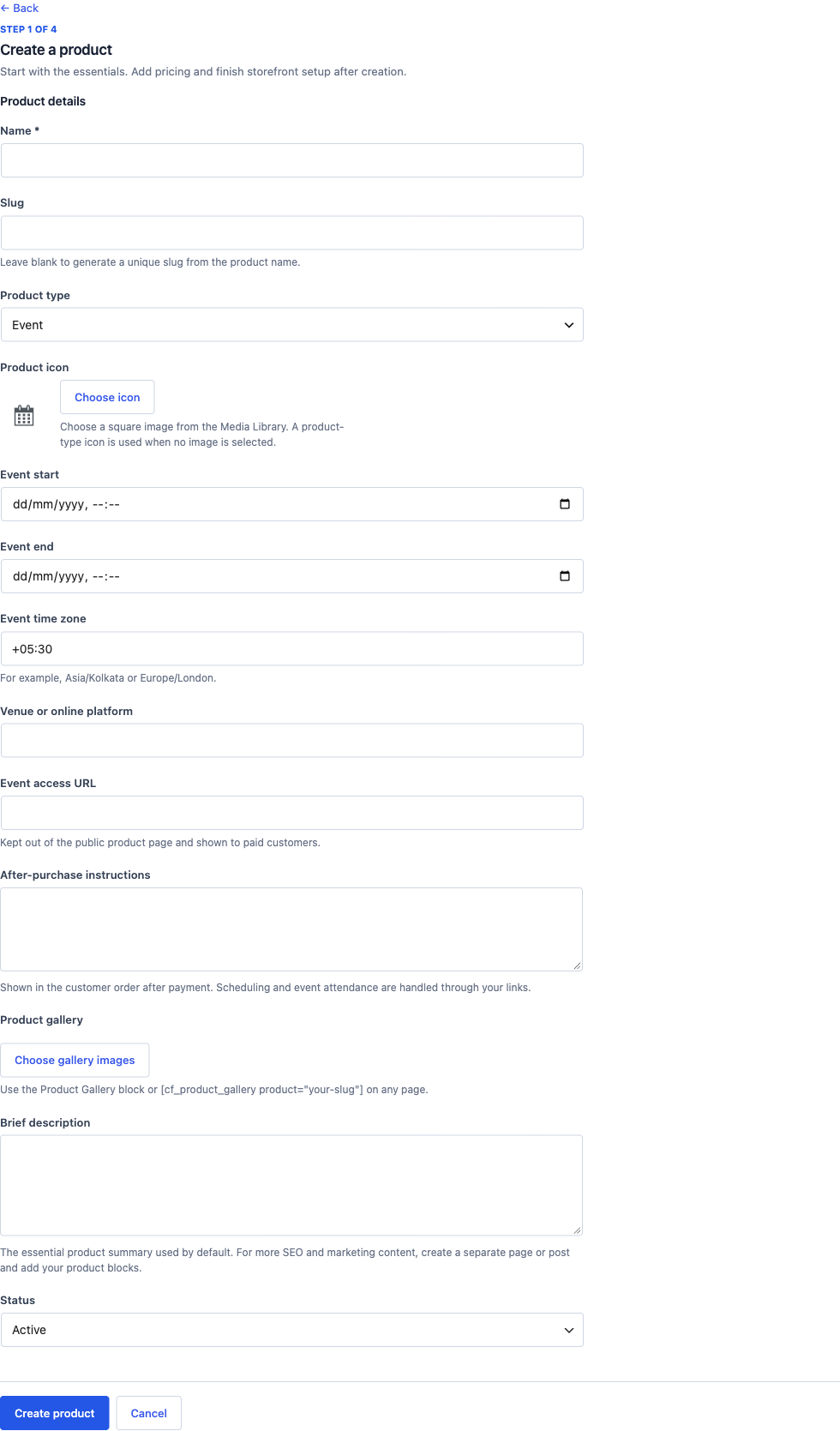
The access link belongs with the customer’s paid order, where a public product visitor cannot read it.
These products use one-time plans and create order records without issuing software license keys. Scheduling and event attendance still happen through the links you provide. This release doesn’t add a booking calendar or an attendance system.
Products also support gallery images. The Product Gallery block can display those images on your own page, while the product’s generated page includes the gallery automatically. If you prefer a shortcode, the equivalent is:
[cf_product_gallery product="your-slug" columns="3"]The gallery uses the selected media-library images and their alternative text. The brief description remains the essential product summary; a longer sales page can live in a separate post or page connected to the product.
Customer Account
The customer dashboard now separates the things a buyer comes back to do. Previously, the page concentrated on licenses and downloads. The account now gives purchase history its own place, so customers can open an order and find what they bought without treating every purchase as a software license.
The account includes:
- Purchase history: Order details and printable receipts.
- Subscriptions: The terms and status associated with the customer’s access.
- Licenses: Searchable keys and activated-site management.
- Downloads: Available product releases.
- Profile: Profile and billing details.
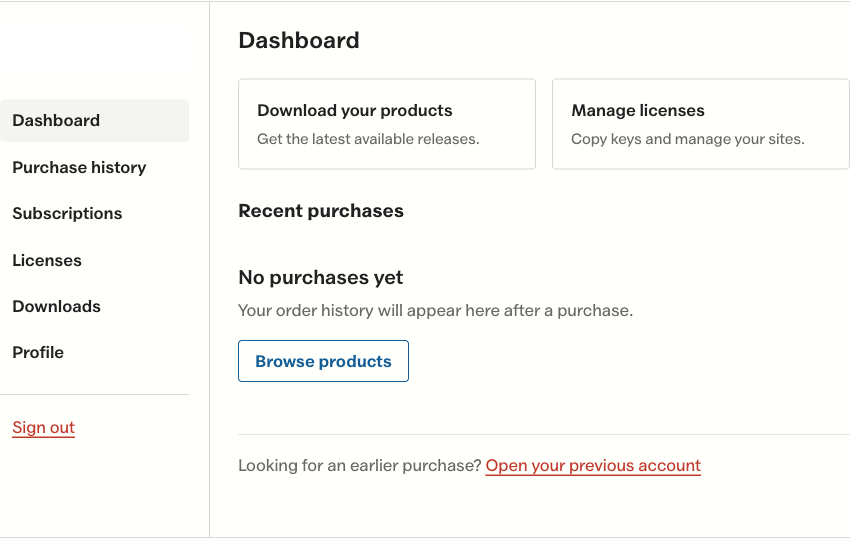
Customers can go directly to the task they came back for. This account has no purchases yet.
The customer page assignment lives in Commerce settings, alongside the support URL. Keep those links useful: an empty account now offers routes to products and support, which is particularly important when someone signs in with a different email from the one used at checkout.
Subscription wording is more precise in this release too. A yearly license describes the access period. It does not, by itself, arrange another charge a year later.
Smaller Changes and Fixes
The release also improves existing forms and the administrative work around them. These are the changes you’ll notice in regular use:
- Submission details: Checkbox answers no longer crash the reply form when the optional email is empty. The recipient field stays empty so you can enter an address manually.
- Submission tables: Field headings appear above their values again, with the column-management controls preserved.
- Form analytics: Tall forms count a view when any part enters the viewport. The first field focus also ensures a view exists, and repeated focus doesn’t create extra starts. Older mismatched counts remain visible with an explicitly labeled rate cap.
- Fullscreen forms: Navigation arrows retain visible icons under theme button styles. Dark choice labels have readable contrast, and long steps scroll clear of the fixed controls.
- Poll results: An Other row includes write-in votes in the results. The total and the displayed vote counts now account for the same answers.
- License keys: New keys can use your chosen character style, length, prefix and grouping. Changing that format does not rewrite keys already issued.
- License maintenance: Missing expiry schedules recover on administrator requests, and concurrent site activations respect the license’s seat limit.
- Product editing: Content connections are searchable, checkout and renewal connections accept direct URLs, and product shortcodes remain visible.
- Documentation: The conditional-logic guide distinguishes the React inspector’s Show/Hide rule controls from the older editor, which requires Code mode for those attributes.
The Limits
Core Commerce is intended for a small product catalog with a clear checkout and delivery flow. There are a few boundaries to keep in mind before choosing it for a particular sale:
- Automatic recurring collection: Native checkout takes a one-time payment. The payment provider owns recurring charging, and provider-backed cancellation must happen through that provider.
- Services and events: Your scheduling and event links handle the activity after purchase. Core Forms stores the order and presents the delivery details.
- Historical analytics: The update cannot reconstruct views that were never recorded. A labeled cap keeps an event ratio from looking like a conversion rate above 100%; it does not rewrite the underlying counts.
The Commerce guide covers the setup and fulfillment flow. The 4.9 release post covers the visual multi-step builder and integrations included in this update, and the 4.10 changelog has the full list of changes.
Final Remarks
If you’re using Core Forms for inquiries or surveys, the submission and fullscreen fixes are reason enough to update. If you’re also selling something, check the product type and the details a customer receives after payment; those are the parts this release makes easier to manage.
The support page is open for bugs and setup questions. Include the form or product type and the step where the problem occurs so I can look at the right part of the flow.
I hope this makes your next setup easier.