
Core Forms 5.0
Core Forms 5.0, released November 9, 2026, turns every optional feature into a module you can switch off and grows Core Commerce into a full store. See what changes when you update.

I released Core Forms 5.0 on November 9, 2026, and it does two big things. Every optional feature becomes a module you can switch off, and Core Commerce, the store built into Core Forms, grows from a license seller into a full store.
Before 5.0, a site with one contact form still loaded the code for payments, polls and dozens of integrations it never used. A store selling through Core Commerce had the opposite gap and had to look elsewhere for coupons, tax, invoices and automatic renewals.
My advice is to update. Your forms keep working as before, because the upgrade leaves every feature you had switched on. If you sell through Core Commerce, I’d read Before You Update first, since two changes affect what your customers receive.
You can get it under Dashboard > Updates with an active Core Forms license. The full changelog lists every change, and the Core Forms documentation covers each setting.
Before You Update
There is nothing to rebuild. These are the changes worth knowing before you click update:
- Modules on upgrade: every module stays on, so existing forms behave exactly as they did in 4.15. New installs start with a small default set.
- Commerce modules start off: Coupons, Tax and VAT, Automatic Renewals and the other commerce modules stay off on upgraded sites. You can turn on the ones you need under Core Forms > Modules.
- New admin menu: Core Commerce now has its own menu next to Core Forms. Old
admin.php?page=core-forms-licensing&tab=…links still work. If your own code checks the screen ID, it is nowtoplevel_page_core-forms-licensing. - Update downloads: if you sell plugins or themes, a site gets the download for an update only after it activates its license key. Other sites still see the new version and are asked to activate. The
cf_license_allow_inactive_downloadsfilter relaxes this. - Customer emails: customers created at checkout no longer get WordPress’s “Login Details” email, because the order email carries a private account link. The
cf_commerce_send_wp_account_emailfilter turns it back on. - Branded emails by default: the branded order and account emails now go out even without the Customer Emails module. My suggestion is to place one test order after updating and read what your customers will receive.
- Database: the 5.0.0 migration adds columns to the orders table for discounts, tax, coupons and invoices. As with any update that changes tables, it is wise to take a fresh backup first.
What’s New in Core Forms 5.0
Six changes carry this release. The first one touches every site; the other five matter if you sell through Core Commerce.
Modules
Modules let you switch off any Core Forms feature your site doesn’t use. Before 5.0, every feature loaded on every site, so a simple contact form carried the code for payment gateways, polls, analytics and 33 integrations.
Core Forms 5.0 has 70 modules, grouped by job: form features, submissions, spam protection, integrations, Core Commerce and a few platform tools. A module that is off loads no files, hooks, REST routes, cron jobs, assets or admin screens. Turning one off keeps its settings and data, so turning it back on restores everything.
You’ll find them under Core Forms > Modules, or in WP-CLI with wp core-forms module list, enable and disable. Each card shows how many forms use that module, and the screen asks before you turn off one that is in use. The Modules nothing uses box lists the ones that are on but unused and turns them off together.
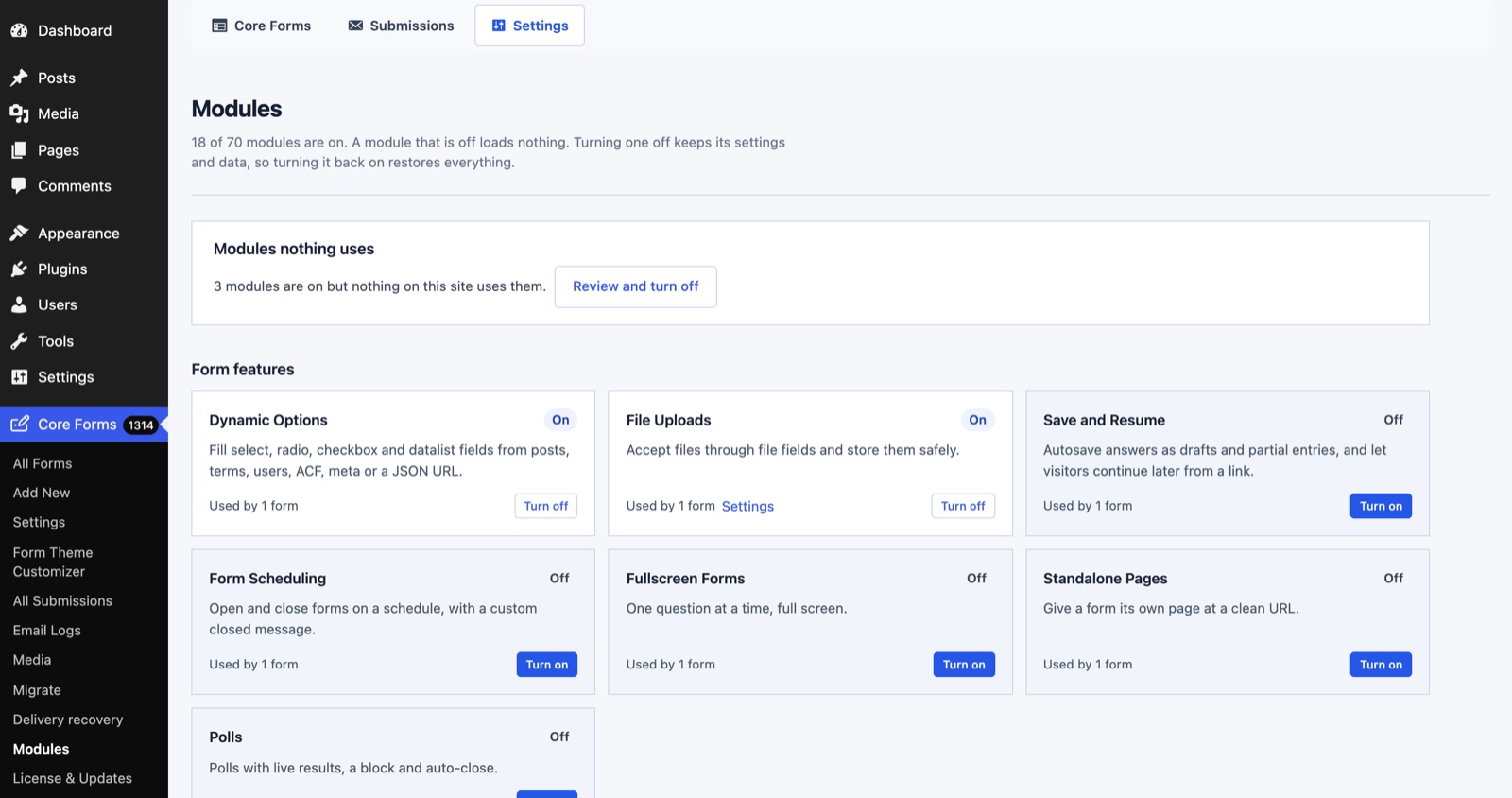 Each card says how many forms depend on it, so you can see what is safe to turn off before you touch anything.
Turning a module off never removes a restriction. Schedules, submission limits, login requirements and required payments stay enforced, and Block Editor Forms and Licensing can’t be turned off while anything uses them. With 13 payment gateways now in Core Forms, a contact form has no business loading all of them to say thank you.
If you build on Core Forms, one function tells you whether a module is on:
if ( function_exists( 'cf_module_enabled' ) && cf_module_enabled( 'polls' ) ) {
	// The Polls module is on for this site.
}
The cf_register_modules, cf_module_enabled and cf_module_changed hooks cover the rest, including registering a module of your own.
Commerce Modules
Core Commerce gets 10 modules of its own. Each one stays off until you turn it on, including on stores that upgrade, so a store that sells one product keeps a short menu.
- Coupons: percentage or fixed codes for the first payment or every payment, with product and plan limits, dates, usage limits, a minimum order and shareable
?coupon=links. - Tax and VAT: rates by country and region, prices with or without tax included, and EU reverse charge with VIES checks.
- Automatic Renewals: recurring plans renew at the payment provider, covered in the next section.
- License Upgrades: customers move to a bigger plan, keep their license key and pay a prorated price. Refunding an upgrade restores the previous plan.
- Invoices: sequential invoice and credit note numbers, with a printable invoice in the customer’s account and in the order email.
- Customer Emails and Reminders: editable branded emails and renewal reminders 30 and 7 days before expiry, on the day and 3 days after. It can also send one email about an unfinished checkout, at most once a week per person.
- Reports: revenue, refunds, MRR, ARR, renewal rate and top products, with CSV export.
- Page Access: pages, posts and other content open only to people who bought a product or chosen plans.
- Client Invoices: invoices for any work, with a payment link the client pays through your gateways, due-date reminders and repeating invoices.
- FluentCart License Bridge: for stores moving licenses out of FluentCart, covered under smaller changes.
Page Access and Client Invoices started in GT Extensions for FluentCart, my add-on for FluentCart stores. Moving them into Core Commerce means a store no longer needs FluentCart to use them.
A restricted page shows its title and a buy button to everyone else. Its content stays out of feeds, search, the REST API, embeds and sitemaps, and it is never cached.
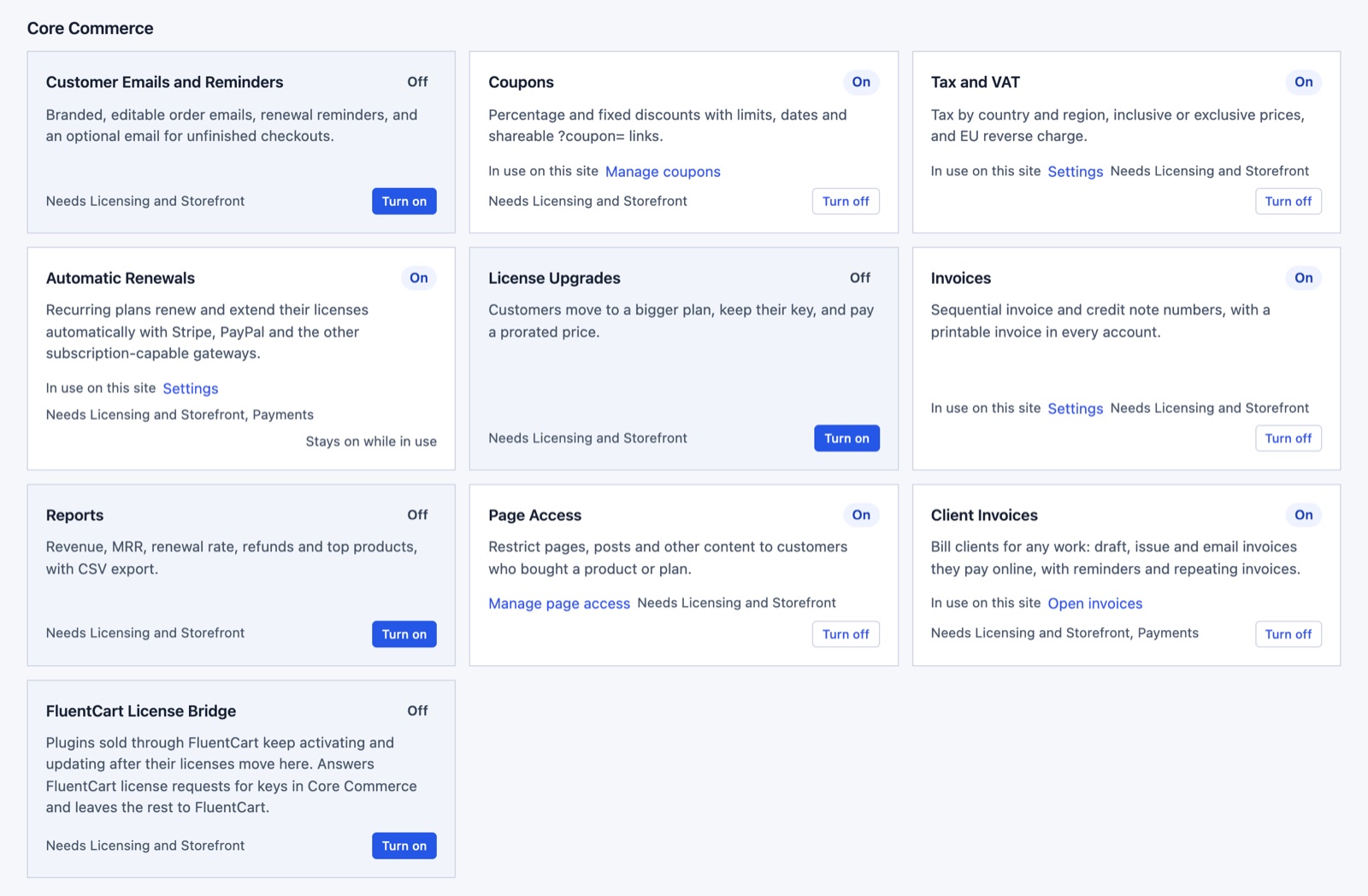 Each commerce module links to where you set it up and says what it needs, such as Licensing and Storefront.
Automatic Renewals
Automatic Renewals turns a recurring plan into a subscription at the payment provider. The customer is charged on schedule, the license extends on its own and each renewal records an order. Without it, a yearly license runs out unless the customer comes back and pays again.
5.0 builds one renewal engine that every gateway plugs into. Failed payments and cancellations are tracked, and customers can turn renewal off or back on from their account. These gateways renew automatically:
- Stripe, through Stripe Billing
- PayPal, through PayPal’s Subscriptions API
- Razorpay and Polar, which gained renewals in this release
- Paddle, Creem, Mercado Pago, Dodo Payments, Mollie, Paystack and Flutterwave, which are new in 5.0
Square is new too, but it takes one-time payments only. That brings Core Commerce to 13 gateways, and new default currency routes put the new ones to work:
- EUR goes to Mollie.
- Latin American currencies go to Mercado Pago.
- African currencies go to Paystack and Flutterwave.
Routes you already set stay as they are. With PayPal, a first payment lower than the renewal price becomes a paid trial cycle.
Paddle, Creem, Polar and Dodo Payments act as the merchant of record and collect tax themselves. Core Commerce refuses an order that would add its own tax on top, so your buyers aren’t taxed twice.
Standalone Checkout Page
The checkout is redesigned in 5.0, and it can now run as its own page without your theme. A checkout inside a theme inherits whatever the theme does to forms, buttons and spacing, and a theme built for reading posts rarely makes a good payment page.
The redesigned checkout brings:
- the order summary and total first on phones, and a summary that stays in view on wide screens
- 48px fields and one main button
- progress feedback that stops double submits
- a layout that adapts to the space the theme gives it
You’ll find Checkout page design under Core Commerce > Settings. With the standalone design, the checkout, product and account pages render without the theme’s header, footer and stylesheets.
Those pages get a small header with your site icon and name, links to your terms and privacy policy, and a button color setting. The paid deal listings on gauravtiwari.org already check out this way.
The order emails changed with it. Each one now has:
- a heading and an inbox preview line
- an order summary table
- the product’s after-purchase instructions
- a plain-text part for mail apps that skip HTML
- a footer with your site and support links
Priced Checkout Questions
Checkout questions can now change the price. They are for the extras people often sell next to a product, such as priority support, a setup call, express delivery or a self-serve discount. Without them, an extra like that needs its own plan or a separate invoice.
Two answer types change the price:
- Checkbox add-on: one extra with a price, such as “Priority support for a year” at +29.
- Choice (pick one): a list where each option can add or subtract, such as “Self-serve” at no change and “Guided setup call” at +49.
You’ll find them in the product editor under Checkout questions. Add question opens a row where you pick the answer type and enter the price change, in the plan’s currency. The same questions can be written one per line:
Site URL | url | required
Priority support for a year | checkbox | optional | +29
Setup help | choice | optional | Self-serve; Guided setup call=+49
The order summary updates as the buyer chooses, and the server works out the price again before payment. The charge, the stored purchase and the license check all use that total, so an order is never fulfilled for less than it costs. Coupons and tax apply to the new subtotal, and each add-on shows as its own line in the order email and on the customer’s order page.
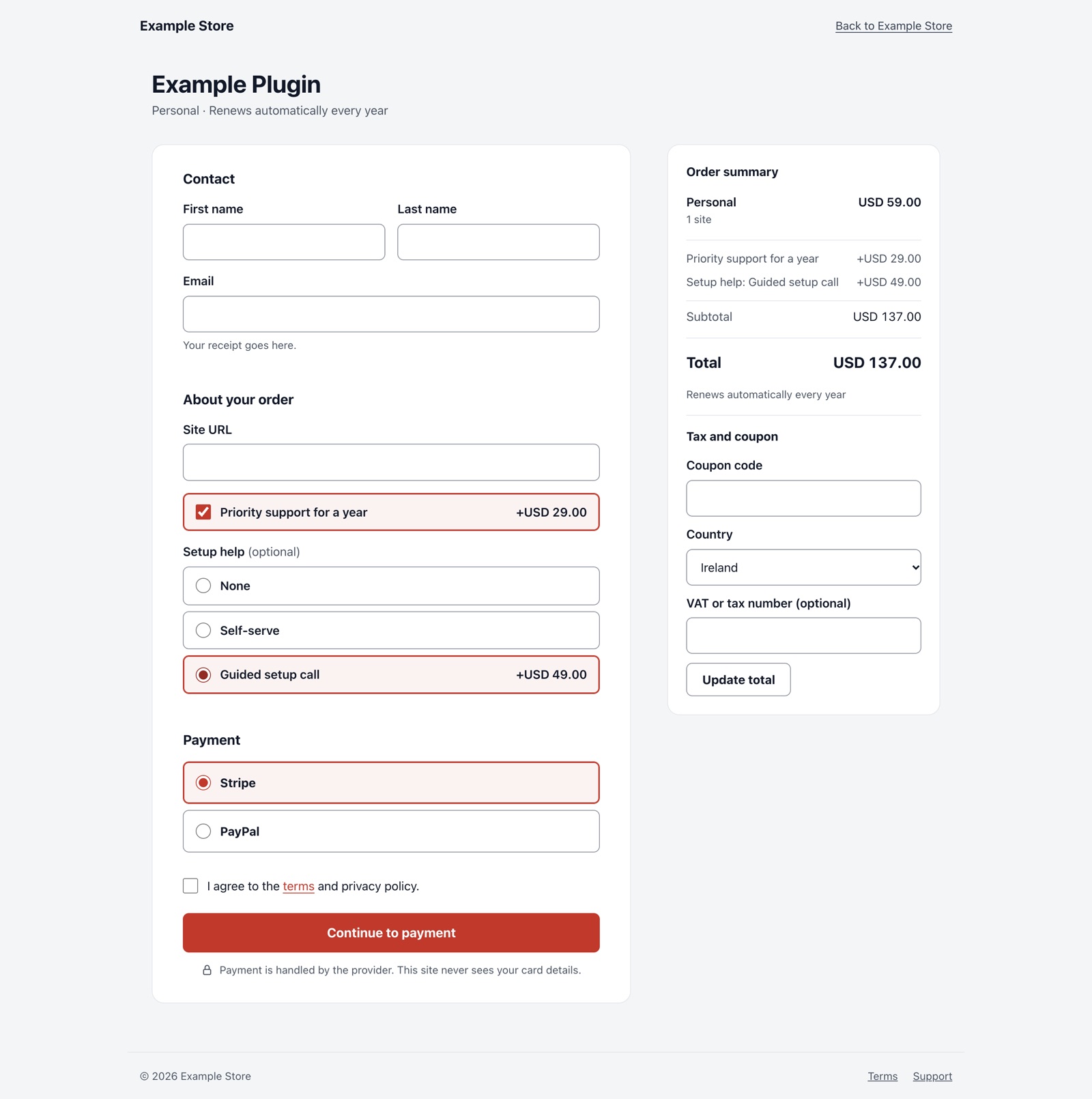 Two add-ons move a USD 59 plan to USD 137 before the buyer reaches payment. This is the standalone design, with no theme header or footer.
On a subscription plan, an add-on changes the first payment only. If that first payment ends up above the renewal price, it is charged once without automatic renewal.
Releases
Plugin and theme products now list every release, and the latest version is the highest stable version number, not the newest upload. Before 5.0, uploading a 1.0.6 patch for older sites after 1.1.0 would have made 1.0.6 the version everyone got.
Pre-releases such as 1.2.0-beta.1 or 2.0.0-rc.1 stay out of automatic updates. Update checks can opt in with beta=1, and customers can still download older versions and pre-releases from the Other versions list on their Downloads page.
The Releases tab on a product shows every version, highest first, with Latest, Pre-release and Older labels, release notes, the checksum and a download link. The publish form tells you where a new version will land before you publish it.
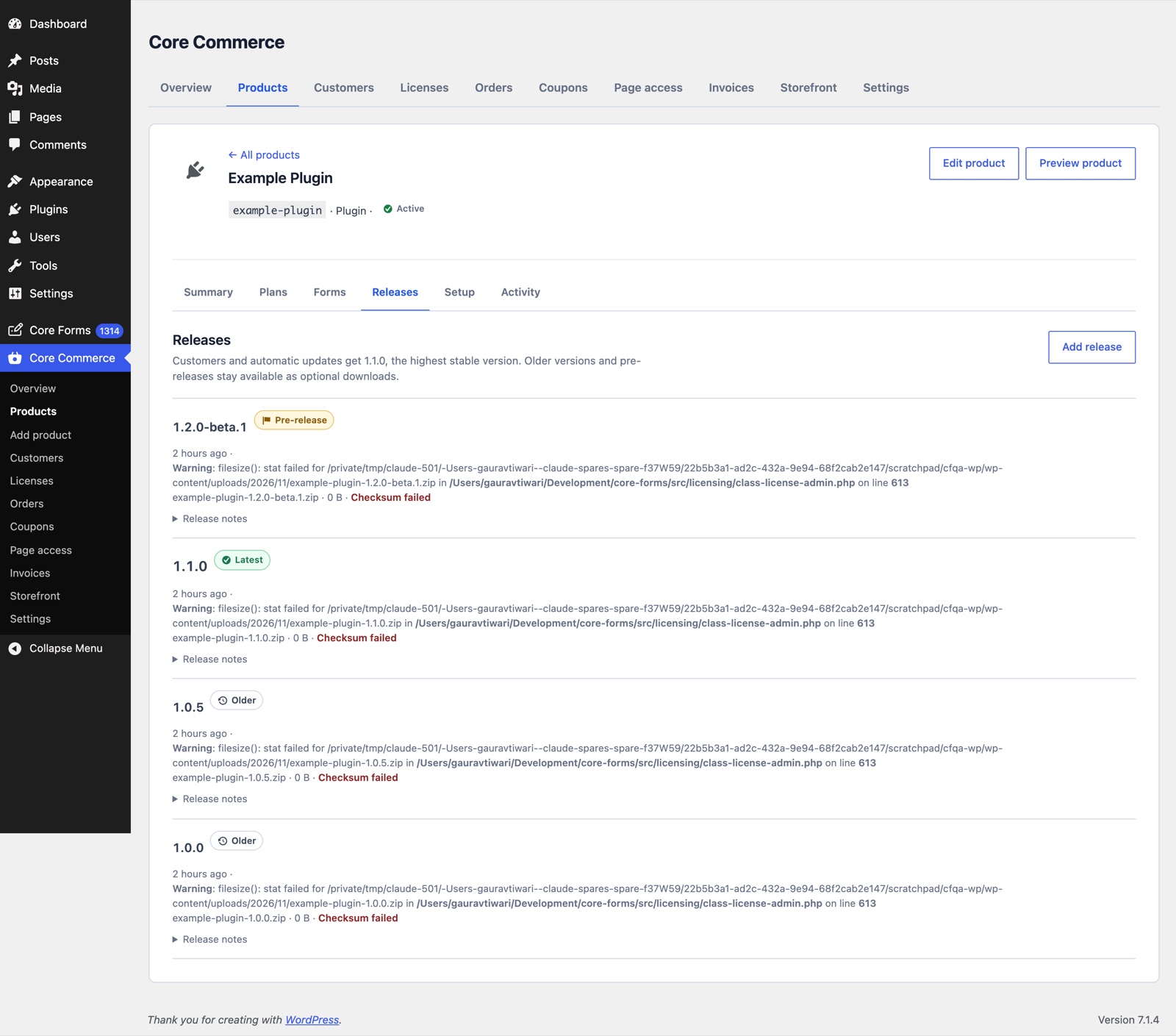 The beta sits at the top, but 1.1.0 is what customers and automatic updates get, because it is the highest stable release.
Licenses can also allow unlimited sites now. A site limit of 0 on a product, plan or license means unlimited, and customers see “Unlimited sites” at checkout and in their account.
Smaller Changes and Fixes
The rest of 5.0 is grouped below. The changelog has the complete list.
These were added:
- FluentCart License Bridge: off by default. It answers FluentCart’s license API, in FluentCart’s own response format, for licenses that now live in Core Commerce. Plugins sold through FluentCart keep activating and updating after their licenses move, and a setting under Core Commerce > Settings keeps it answering after FluentCart is deactivated.
- FluentCart import:
wp core-forms commerce import-fluentcart --dry-runcounts what would move. Without--dry-run, it copies licensed products, plans, orders, licenses with their exact keys and site activations. A second run adds only what is new. - Product deletion: a product that has never sold can be deleted. Products with orders, licenses or a pending payment have to be archived instead.
- After-purchase instructions: service and event products get a small editor with bold, italic, links and lists. The formatting shows on the order page and in the order email.
- Free orders: the store owner now gets a “New order” email with the checkout answers for free orders too.
- Terms URL: a store setting that the checkout agreement links, next to your privacy policy.
- Update details: plugin and theme products carry the required WordPress and PHP versions, the tested-up-to version, a homepage and a banner for WordPress’s View details screen.
- Stripe refunds: refunding a renewal rolls back only that renewal and issues a credit note. Refunding the first charge refunds the original purchase.
These changed:
- Form editor: the Payment, Headless and Analytics tabs and the Save & Resume and Scheduling settings hide when their modules are off. Their saved settings are kept.
- Renewals: customers can turn renewal back on after cancelling it, while the term is still running.
These were fixed:
- PayPal: a buyer returning from PayPal now captures the approved payment, so a late or missing webhook can’t leave it uncaptured.
- Webhooks: PayPal, Razorpay and Stripe events that Core Forms doesn’t use are acknowledged, so the providers stop retrying them.
- Polar: one-time checkout uses Polar’s current products API and no longer fails when a form has no Polar product.
- Service and event checkouts: they no longer mention licenses or access links.
- License upgrades: upgrading a license with a PayPal or other non-Stripe subscription now turns the old renewal off instead of charging the old price.
- Migrate page: backup and restore stay available when the Importers module is off.
- Partial entries: the switch in the “After submission” card now saves. A hidden duplicate used to overwrite it.
The Limits
5.0 is a big release, and a few things it doesn’t do are worth knowing before you plan around it:
- Renewals need a license: automatic renewals work for plugin, theme and digital products. Service and event products have no license to extend, so they can’t renew automatically.
- Square is one-time only: it can’t renew a subscription.
- Merchant-of-record gateways and tax: Paddle, Creem, Polar and Dodo Payments can’t be combined with Core Commerce tax on the same order.
- Add-ons on subscriptions: a price change applies to the first payment only.
- One file per release: each release is a single ZIP. A product that ships several files, such as a PDF and an EPUB, has to bundle them into one ZIP.
- Client Invoices: deposits, currency switching, extra invoice layouts, shipping fields and FluentCart invoice number sync didn’t come over from GT Extensions.
- FluentCart import: it copies licensed products only. Active subscriptions keep renewing through FluentCart, so I’d keep FluentCart installed until they renew or lapse. A later import run picks up the new expiry date.
If you move a store to one of the 8 new gateways, I recommend one small real purchase and a refund before you send customers there. A test like that shows the whole path, from payment to license to email, on your own account.
Docs and Links
These pages go deeper than this post:
- Core Forms 5.0.0 in the changelog, with 4.11 to 4.15 below it.
- Core Forms documentation for every setting and integration.
- Products, licenses and subscriptions for setting up Core Commerce.
- Core Forms 4.10, the last release post, covering Service and Event products.
- Core Forms support for problems with an existing installation.
Final Remarks
If you use Core Forms only for forms, 5.0 asks nothing of you. I’d still open Core Forms > Modules once after updating and turn off what nothing uses, so your site stops loading features it never needed.
If you sell through Core Commerce, I’d turn on only the modules your store needs, then place one test order and read every email it sends. If a result doesn’t match what you set up, support is the place to tell me.