
Tutorial
Send WhatsApp from a WordPress form
Send WhatsApp from WordPress forms using native Meta Cloud API, Twilio WhatsApp, or click-to-WhatsApp actions in Core Forms.

A form can hand a visitor over to WhatsApp or send a message through a business messaging API. Those are different outcomes: one opens a conversation for the visitor to send; the other asks a provider to deliver a message.
Core Forms includes native actions for Meta WhatsApp Cloud API, Twilio WhatsApp, and a click-to-WhatsApp redirect. Choose the action that matches the handoff you need.
Choose the right WhatsApp action
| Goal | Core Forms action | What happens |
|---|---|---|
| Send through Meta | Send WhatsApp (Cloud API) | Sends a template or eligible free-form message using your business credentials. |
| Send through Twilio | Send WhatsApp (Twilio) | Uses your Twilio account and WhatsApp-enabled sender. |
| Let the visitor start a chat | Redirect to WhatsApp (wa.me) | Opens a pre-filled message; the visitor still has to send it. |
A custom webhook bridge is unnecessary for these supported actions. Use the webhook action when you have a separate routing or automation requirement.
Set up Meta WhatsApp Cloud API
Prepare your WhatsApp business sender and credentials with Meta, then configure the form:
- Open the form’s Actions tab and add Send WhatsApp (Cloud API).
- Configure the access token and phone number ID in the global WhatsApp Cloud settings, or use the action’s Access Token (override) and Phone Number ID (override) fields.
- Set To Number to the intended recipient, or use a field variable such as
[phone]when the message belongs to the submitter. - Choose Message Type. For a template message, supply the approved Template Name, Language, and Body Variables in the order the template expects.
- Save the form. Test with a recipient who has agreed to receive the message, then inspect both the action result and provider delivery status.
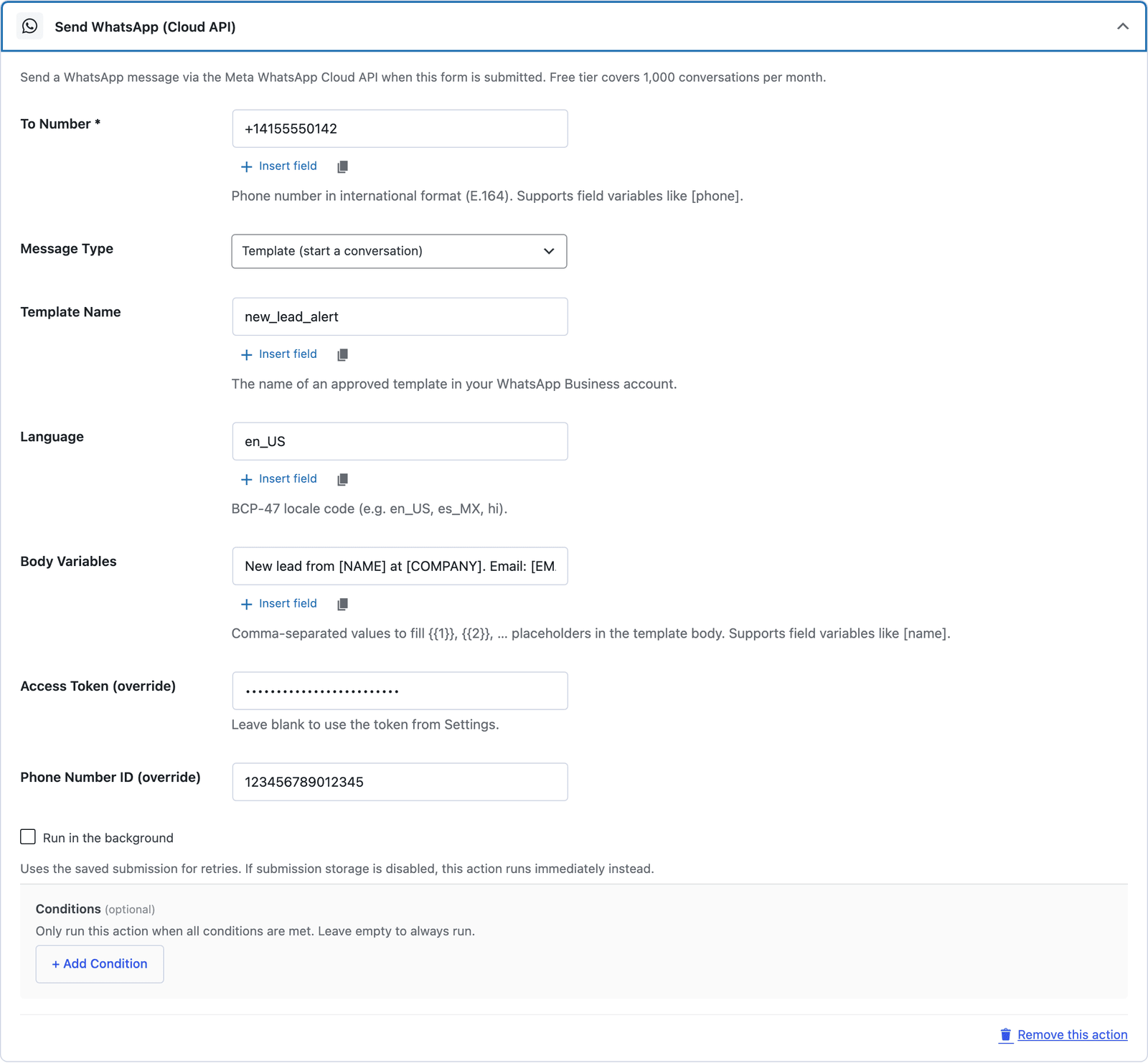 Template is the message type that starts a conversation. A free-form message only works inside a 24-hour window the recipient opened.
For a template whose body placeholders represent name and inquiry, use the corresponding form variables, such as [name] and [inquiry], as comma-separated entries in Body Variables. Match the approved template’s language and parameter count exactly.
Keep access tokens in the plugin’s credential settings. Do not paste them into public form HTML or frontend JavaScript.
Set up Twilio WhatsApp
Add Send WhatsApp (Twilio) in the form’s Actions tab:
- Enter Account SID and Auth Token.
- Set From Number to your WhatsApp-enabled Twilio sender.
- Set To Number to the recipient or a field variable such as
[phone]. - Enter international-format numbers without the
whatsapp:prefix; the action adds it. - Use Message for eligible free-form messages. For an approved template, provide Content Template SID and Template Variables. When a Content SID is set, the action uses the template instead of Message.
Example template-variable mapping:
{"1":"[name]","2":"[inquiry]"}Use the variables your approved template requires. Twilio’s sandbox is useful for testing with joined test recipients; production delivery needs a configured WhatsApp sender. The same Twilio account can also support the separate SMS action.
Let visitors start the chat themselves
For a visitor-led sales conversation, add Redirect to WhatsApp (wa.me):
- Enter your destination WhatsApp Number in international format.
- Write a Pre-filled Message, using field variables where helpful.
- Save the form and test the handoff on a phone and desktop.
For example:
Hi, I am [name]. I would like to discuss [inquiry].The action builds the link and encodes the message. Opening WhatsApp does not send it automatically, and a successful form submission is not proof that the visitor sent the chat message.
Consent, templates, and delivery still matter
Native integration does not remove the provider’s messaging rules:
- Obtain the recipient’s opt-in before business-initiated messaging. Template approval does not replace consent.
- Free-form replies are limited to the customer service window opened by the recipient’s message. Outside that window, use an approved template.
- A form submission alone does not open that WhatsApp service window.
- Check provider delivery status; an accepted API request does not prove delivery.
Twilio documents the service window and template behavior in its WhatsApp concepts guide.
Check current costs before choosing a provider
Do not budget from the old claim that Meta includes a fixed monthly allowance of free conversations. Charges depend on the message category, destination, applicable service-window rules, and provider. Twilio adds its own messaging fees alongside applicable Meta template-message fees; use its current pricing for your destination and message type.
Choose the redirect when the visitor should initiate the chat. Choose a native API action when your workflow needs business-message delivery. Configure one path, test it with an opted-in recipient, and confirm the message reaches the intended person before relying on it for leads.
For the email version of the same acknowledgement, the auto-reply guide covers the wording, and the lead response time plan says where the message sits in the follow-up.