
Core Forms 4.9
Core Forms 4.9 through 4.9.6: visual multi-step forms, working previews, new integrations and fixes for editing and submissions. See what changes when you update.

Core Forms 4.9 began with submission and payment fixes on September 5, 2026. The latest release in this series, 4.9.6, adds industry-focused templates, dragging fields between steps, and a faster poll editor. It includes the visual multi-step builder, working previews, integrations, and fixes from the earlier patches.
I recommend updating, particularly if your forms use captcha protection or calculated payment amounts. Some fixes affect database tables and existing defaults, so a current backup and a check of your important forms should be part of the update.
You can get it under Dashboard > Updates with an active Core Forms license. The full changelog lists every change, and the support page is there if you need help with a particular setup.
Before You Update
There is no need to rebuild your forms. If you’re upgrading from 4.8 or earlier, the original 4.9 changes below deserve attention. If you’re already on 4.9.x, the later patches include those fixes; the new features and integration requirements are covered in the next section:
- Submission indexes: Core Forms adds database indexes for the fields used to find and count submissions. A site with a large submissions table should allow time for the migration.
- Unused store defaults: Earlier versions could create store pages and enable the license API during activation. The upgrade disables that API and returns untouched generated pages to draft where the stored records show an unused default store. Stores with genuine commerce records are preserved.
- Fullscreen compatibility: Forms with payments or multiple steps fall back to Normal mode because the fullscreen interface cannot correctly represent those features.
- Default form colors: Saved colors that still match the old defaults receive the improved contrast values. Colors you chose yourself are preserved.
The data-loss fixes prevent those operations from causing the same damage again. They do not restore HTML or metadata that an earlier version already removed. If something is missing before you update, keep the relevant backup or revision available.
Updates in the 4.9 Series
The releases after 4.9.0 improve the form editor and the actions that run after a submission. Core Forms 4.9.6 includes the earlier fixes, so you can update directly to it without installing each patch separately.
Core Forms 4.9.6
Core Forms 4.9.6, released September 15, 2026, makes longer forms and quick polls easier to build:
- Move fields between steps by dragging. Drop a field or container onto another step tab to move it without rebuilding the layout.
- Start with an industry template. New multi-step samples include relevant fields, email actions, acknowledgement messages, and submission settings. Multi-step badges and layout filters help you choose. Check recipients and connect any required services before using a template publicly.
- Create polls in one column. Question, Settings, Schedule, Embed, and Results load together. Switching tabs keeps your edits without reloading the page. Press Enter in the last answer field to add another answer.
- Find blocks faster. Type
cfin the block inserter to find Core Forms and Core Polls. - Use the gallery at smaller widths. Category filters wrap across the available width, and template buttons retain readable hover colors.
Core Forms 4.9.5
Core Forms 4.9.5, released September 14, 2026, makes multi-step forms available in the visual builder. Previously, the form’s schema needed to define the steps. You can now split a longer form into named steps from the same screen where you add its fields.
The setup starts under Fields > Form layout > Multi-step:
- Name the first step and add its fields.
- Choose Add step to create the next part of the form.
- Select a field and use Move to step if it belongs elsewhere. Fields inside a container move with that container.
- Use Move step earlier or Move step later to change the order. Removing a step moves its fields to the adjacent step named in the editor.
- Choose Save & preview, then check the form at Desktop and Mobile widths.
For a service inquiry, for example, contact details can sit in the first step and the project brief in the next. Visitors can return to their earlier answers with Previous. Required fields and invalid optional values are checked before they advance, and the submit button belongs to the final step.
The form also has its own scoped styles. The step indicators use plain labels with an active underline, while the navigation and field spacing come from Core Forms rather than the WordPress theme. Both save controls retain the step layout through Visual and Code edits.
The preview is a working form, so submitting it runs its configured actions. A preview submission can send a notification or reach a connected service; use appropriate test details when checking it. This release also fixes missing preview scripts and prevents URL prefill from replacing the form’s submission token.
The new integrations cover several common destinations:
- Fluent Support: Create customers and support tickets, with inbox and product mapping.
- n8n: Send authenticated webhooks with typed JSON values and selected fields.
- Pipedrive: Match people and organizations, then create leads or deals.
- Zendesk: Create tickets with requester details and supported submission attachments.
- Resend: Send transactional email and receive signed delivery or bounce events.
- FlowMattic: Pass named form values to Plugin Actions workflows.
Administrators can test an action with editable sample data and read its result in the editor. The destination still needs the right credentials and permissions. An action test is useful for checking the connection, but the full form should also be checked with its actual fields and conditions.
Core Forms 4.9.4
Core Forms 4.9.4, released September 12, 2026, improves what happens after a submission reaches an integration. A provider rejecting a request should leave an error you can investigate, not a result that looks successful.
The changes include:
- Action results: Transport errors, provider rejection and missing handlers are reported consistently across submissions and paid fulfillment, including tests and replays.
- Background delivery: Eligible actions can run in the background and retry temporary failures. Background work requires a saved submission.
- Saved settings: Unavailable integrations retain their configuration, field mappings are validated and unchecked options stay off.
- Provider fixes: Corrections cover Notion properties, Airtable values, FluentCommunity membership and WhatsApp webhook responses.
- Google Sheets: The receiver uses a shared secret that must match the form action’s secret.
If you use Airtable, its token needs schema.bases:read and data.records:write for the selected base. Notion connections need read and insert access to the shared database or data source. Those permissions are part of the setup; updating the plugin cannot grant them on your behalf.
Core Forms 4.9.3
Core Forms 4.9.3, also released September 12, 2026, fixes another source of trouble when moving between HTML and the visual editor: a styled wrapper should remain a wrapper around its field.
The main changes are:
- Wrapper classes: Supported attributes and classes on individual
p,divandspanwrappers survive Code and Visual edits without hiding the input or becoming layout containers. - Support Request template: The template includes site details and priority, with an administrator notification and a submitter acknowledgement using the site’s email settings. Applying it saves those actions through either save control.
- Required fields: Native
requiredvalidation no longer produces a redundant missing-aria-requiredwarning. Existing validation and explicitly authored ARIA remain intact.
Core Forms 4.9.2
Core Forms 4.9.2, released September 12, 2026, improves how the editor keeps a form intact as you change it. This matters particularly when you alternate between writing HTML and editing fields visually.
The fixes cover:
- Code and Visual changes: Choice groups and their selected values survive, alongside nested layouts and helper text.
- Immediate saves: Saving straight after an HTML edit keeps the latest fields.
- Field duplication: Duplicating nested fields updates their internal references and avoids duplicate choice values.
- Validation: Conditional fields and required checkbox groups behave consistently, and server checks accept valid zero values.
- Field controls: Name, Address and Rating fields render usable controls. Named submit buttons keep their submitted values.
Core Forms 4.9.1
Core Forms 4.9.1, released September 11, 2026, focuses on the basic field output and the HTML attributes people use to make forms easier to complete.
- Consent fields render as working checkboxes, start unchecked when newly added and retain their type through Code and Visual changes.
- Field wrappers follow the chosen
p,divorspansetting, including inside nested layouts. - HTML imports retain supported attributes such as
autocompleteandinputmode, along with ARIA and data attributes. - Generated HTML escapes quoted attribute values and excludes unsafe event-handler attributes.
What’s New in Core Forms 4.9
The visible changes focus on finding the right control and understanding what a save will do. Most of the improvement is in ordinary work: changing a setting, checking submissions or returning to a product you need to finish setting up.
Settings
Global Settings now lets you work in one section at a time, with search across the settings and a Show all sections option when you want the full page.
The earlier page placed every section in a long form. Finding a captcha setting meant scrolling past unrelated email or payment controls, and the navigation could highlight more than one section. The section list now gives you one current location.
A few details make this more useful than simply hiding parts of the page:
- Search finds sections from their labels and descriptions.
- Unsaved changes clears when you restore a setting to its original value.
- Save settings remains reachable, including on smaller screens, and returns you to the section you were using.
- Validation opens a hidden section if a field there needs correcting before the form can save.
Saving still applies to the settings form as a whole. A section being out of view does not remove its values from the save.
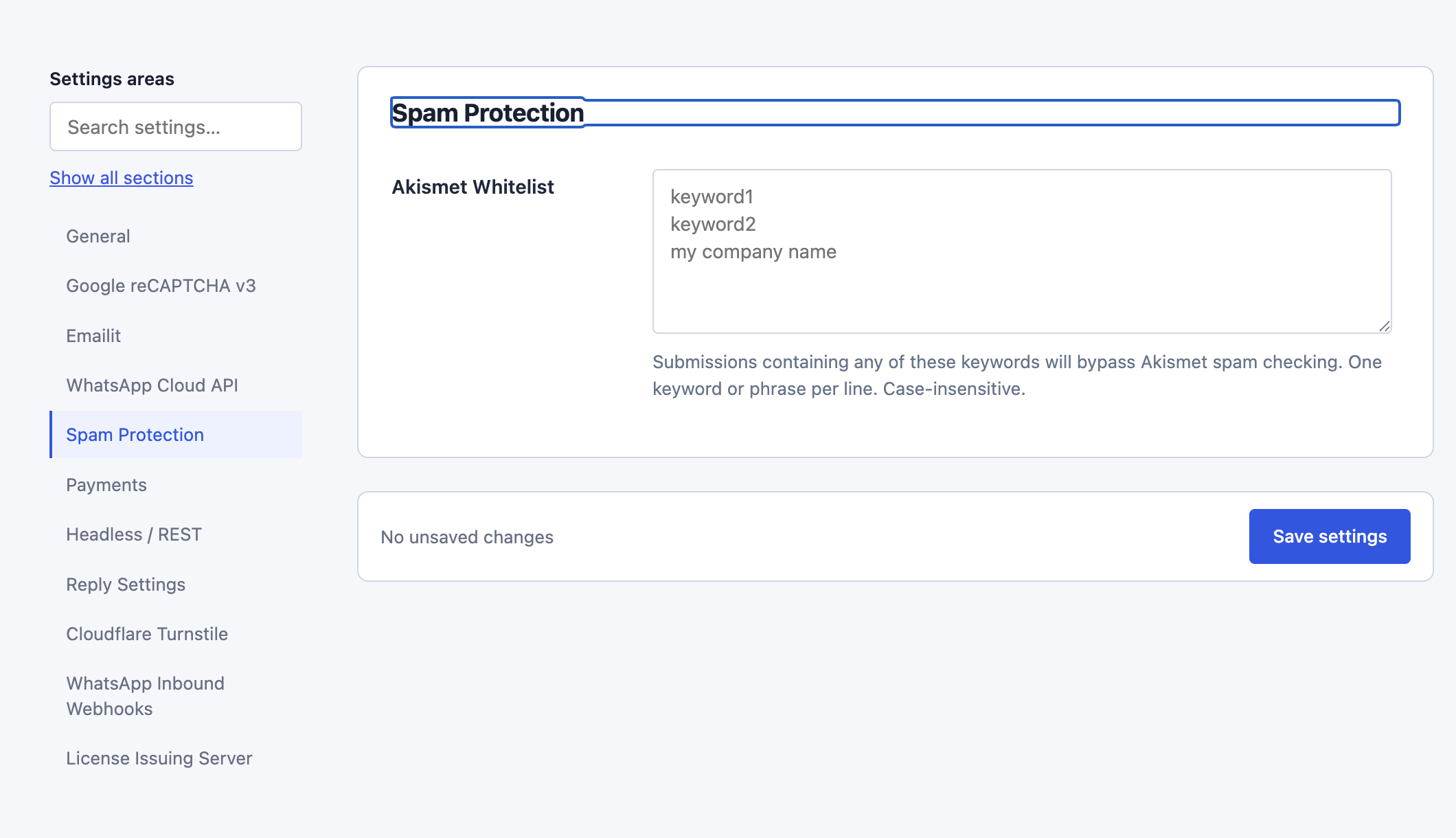
The section list keeps unrelated controls out of the way while the save bar makes the current save state visible.
Core Commerce
Core Commerce keeps the same places for managing products and customer access, with flat tabs that match the rest of the plugin. The thick tab baseline and extra borders around action rows are gone.
Recent activity now groups the person or system responsible beneath each event, with the date alongside it. That keeps an event and its context together when the page becomes narrow, instead of making you read across separate columns.
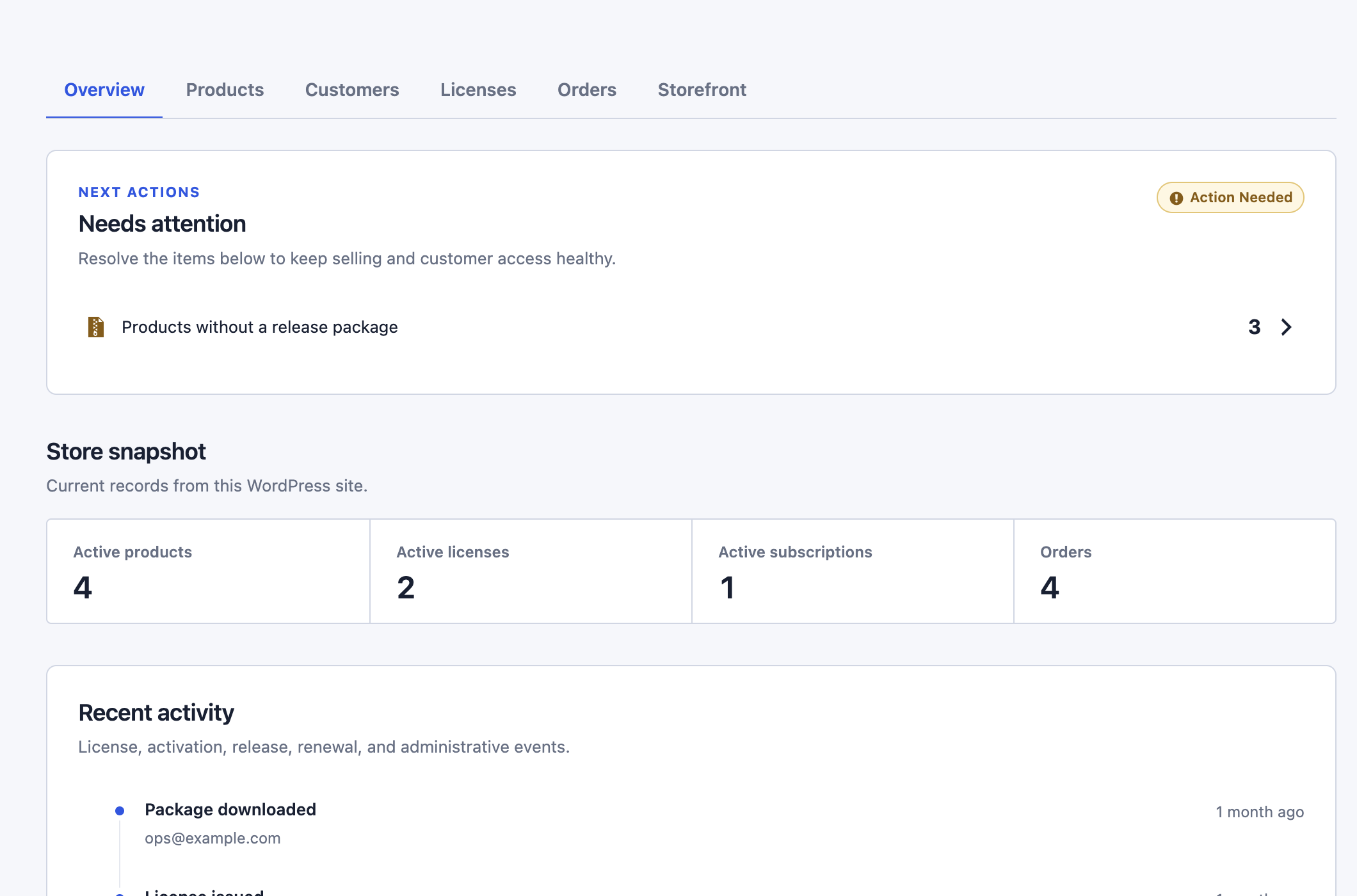
The overview keeps setup work above the store totals, so an unfinished product is easy to find.
These changes help you read the existing records. They do not create release packages or complete product setup for you; an item under Needs attention still needs the action it names.
Fixes That Matter to Existing Forms
The admin is the part you can see immediately. The following fixes are the stronger reason to update.
Form and Submission Safety
Saving a form from a tab other than Fields could replace its HTML with an empty value because that tab did not submit a markup field. Core Forms now retains the stored HTML when the control is absent. Changing a notification or payment setting should not cost you the form you built.
Related fixes cover the rest of the submission path:
- Bulk deletion removes submission data without treating submission IDs as WordPress post IDs and deleting unrelated post metadata.
- Failed inserts no longer produce a success response and trigger notifications as though the submission had been stored.
- File uploads reach the server when a form uses the no-JavaScript submission path.
- Field validation follows the fields the form actually renders, including forms saved through the visual builder.
Spam and Payment Validation
Captcha protection has to distinguish a rejected visitor from a broken check. The reCAPTCHA and math-captcha validators now read the submitted tokens correctly, so valid responses reach validation instead of being discarded first.
The payment and privacy checks also received fixes:
- Calculated payment amounts are recomputed on the server rather than accepted as a total supplied by the browser.
- Draft saving checks the form nonce and field allowlist before storing submitted values.
- Template tags can read only the supported user and post properties, rather than exposing sensitive fields.
- GDPR erasure matches the exact submitted email address instead of treating parts of it as search wildcards.
These fixes improve the checks Core Forms performs. They do not replace payment-provider configuration or make every possible form immune to spam.
Smaller Changes and Fixes
A few other changes will show up during regular work:
- Submissions: Search, date range and status filters now work together. Bulk controls are available above the records, and the per-form inbox has search.
- Form editor: The toolbar uses consistent colors for its controls and disabled states. Shortcodes have copy buttons that work from the keyboard.
- Standalone URLs: The URL, Copy and Open controls align in one row. URL displays appear only when Fullscreen mode and standalone publishing are enabled. Changing the URL base now refreshes the correct route.
- Duplicate prevention: Repeated submissions with identical values can be refused within the duplicate-detection window. A changed answer is treated as a new submission.
- Email logs: A failed send records the error reported by the mail transport. An accepted send still does not prove that the email reached the inbox.
- Spam reprocessing: Marking a submission as valid respects the conditions on its configured actions.
- Diagnostics:
wp core-forms doctorchecks installation health, with related information available under Tools > Site Health > Info. - Uninstall: Delete data on uninstall is off by default. Turning it on means deleting the plugin also removes its stored data; deactivating it does not.
The Limits
The fullscreen interface still handles one question at a time and does not support payment forms or multi-step layouts. Normal mode is the appropriate choice for those forms.
The built-in contrast checks cover the tested color combinations. They do not certify an entire form or the page around it as accessible, particularly when a theme or custom CSS changes what visitors see.
And a successful update does not prove that every integration on your site is configured correctly. A form that sends to a mail provider or a webhook still needs a submission that confirms the destination received what you expected.
Docs and Links
The detailed references are available here:
- Core Forms 4.9.6 in the changelog, with the earlier 4.9 releases below it.
- Core Forms documentation for configuration and integration details.
- Core Forms 4.8, the preceding release covering minified assets and form detection.
- Core Forms support for problems with an existing installation.
Final Remarks
Once you have updated, the useful next step is to check the forms people depend on. A contact form should leave a stored entry and the expected notification. A paid form should use the amount your calculation produces and reach the correct payment state.
I would also check a multi-step form from start to finish, including returning to an earlier answer and submitting from the final step. If you use an integration, confirm the destination received the expected values; a saved form entry is only part of that check.
The documentation covers the individual settings, and support is available if a result does not match the configuration. I hope this update makes your forms easier to maintain.
The next minor release, Core Forms 4.10, adds Service and Event products, a fuller customer account and further survey fixes.